
Here’s the Technorati homepage. If you’re signed in, your blog’s basic stats would appear at the upper right corner, which is now covered occupied by advertising:
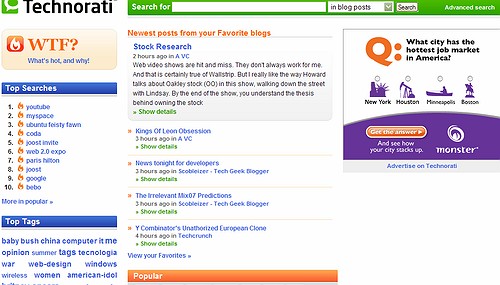
It’s frustrating enough to see ads hide actual content on Yahoo..etc, but normally there’s a way to click and close it. Not this one. This is a solid ad, you read it or leave it, it won’t go away. So where’s the account data? Your guess is as good as mine … it’s gone! You can randomly click around, and find it after a few clicks via Favorites, Ping ..etc – but the most important information, along with your inbound links is completely missing from the Front Page.
Perhaps Technorati are just as confused as I am… the WTF button on the left takes on a new (old) meaning…
Update (4/25): Apparently it was a bug, Technorati fixed it. Kudos for responding fast! At the same time…I know it’s “release often, release early” but I didn’t think testing became a 100% user function…

Click on your profile to see your stats.
It’s not “covered” by the ad… it’s been replaced by the ad.
From Zedo.com… I don’t see it thanks for Ad Block Plus and Firefox. all I see is the “Advertise on Technorati” link.
Thanks, that was exactly my point, sorry if I didn’t make it clear enough: that unlike Yahoo.. et al, you don’t get to just close the ad then see your content – it’s gone!
That’s the most important piece of Technorati information, now hidden on secondary pages. This has to be an joke.
Zoli, we pushed a new release out yesterday which had a bug that broke the module on the home page for a bit. The “Your Blogs” feature is back in action.
Sorry for the inconvenience. Dorion