My readers are predominantly English speakers, as evidenced by this distribution chart:

Readers by Language - http://sheet.zoho.com

I suspect the 87% English-speaking majority may be exaggerated.  It’s based on the browser’s default language setting, which many don’t bother changing.

Anyway, for the sake of the min. 13%, but who knows, perhaps 20, 25% (?) I’ve installed Google’s Translator.  You can do it too.smile_wink Readers then can select a language from the widget,  but the real use case is for visitors whose default browser language is non-English: they will get a bar at the top asking if they would like all content served up in their language.

Machine translation still has rough edges, but it has come a long way, and is generally good enough to give readers an idea of what an article is all about – just forget grammar and style:-)

Here’s an example of this post in a few languages:

arito pumunta kami ulit: Ed Bott points out kung paano marahas ito ay para sa Apple na i-install ang tinatawag na “update” sa iPhone Configuration Utility sa isang Windows computer na hindi magkaroon ng software na ito na naka-install, sa katunayan isa na ay hindi kailanman nagkaroon ng iPhone o iPod konektado sa.

在這裡 , 我們åˆä¾†äº†ï¼š 埃德åšç‰¹æŒ‡å‡º , 如何è’謬的是 , è˜‹æžœé›»è…¦å°‡å®‰è£æ‰€è¬‚的“更新â€çš„iPhoneé…置實用程åºåœ¨Windowsè¨ˆç®—æ©Ÿä¸Šæ²’æœ‰å®‰è£æ­¤è»Ÿä»¶ï¼Œå…¶å¯¦ä¸€å€‹å¾žæœªæœ‰éŽçš„iPhone或iPod connected to.

Ở đây, chúng tôi Ä‘i má»™t lần nữa: Ed Bott chỉ ra như thế nào thái nó là Apple để cài đặt cái gá»i là “cập nhật” vào Configuration Utility iPhone trên má»™t máy tính Windows mà không có phần má»m này được cài đặt, trong thá»±c tế, má»™t trong đó có không bao giá» có má»™t iPhone hoặc iPod kết nối đến.

(I’m sure it’s right, whatever it says. smile_shades)

Update:  Here’s something I missed, but Sandy Kemsley didn’t:

If you read this, or other Google Translate-enabled blogs in Google Reader, you can set it to auto-translate there.  Neat.

Related posts:

Tags: , , ,

Here we go again: Ed Bott points out how outrageous it is for Apple to install so-called “updates†to the iPhone Configuration Utility on a Windows computer that does not have this software installed, in fact one that has never had an iPhone or iPod connected to.

He is right, this is obviously not an update, but installing new, and in his case obviously unnecessarily software.   It’s also not the first time, I described my  similar experience early last year. Back then I also wrote:

Apple fans are a religious cult who came in hordes to defend Holy Apple. (before you chastise me, just look at how often I point to Apple as a better choice, without becoming blindly faithful)

And boy, did I prove right on that …

Read more here.

Tags: , , , , , , , ,

My fellow Enterprise Irregulars are at SAP’s TechEd in Berlin, Germany.  David Terrar is apparently in Windows-prison, as he observed:

Here in the Bloggers Room at SAP TechEd 2008, the Windows users (of which I am one) are consigned to one end of the room. We have to take regular abuse from the Mac fanboys. As you can see, the score is Apple Mac 8 Windows based PCs 3. In the blog world we M$ types appear to be a dying breed.

I told him he’d probably get a very different count in the keynote theater, where the real corporate folks are, who don’t have a choice – unless they all work for Citrix. smile_wink

Photo credit: David Terrar

But there’s something else strikingly obvious on this photo. Windows is out.  But Windows are in – I mean the real ones, letting daylight in.  This is something we’ll never get in the US.  I almost forgot the luxury of having windows (not the MS-kind) is quite normal in Europe.

Tags: , , , , , , , ,

This is one of those rare occasions when I can pull up an old post, dust it off,  and voila! – I’m done.  Yes, I am lazy – but hey, I can’t help, this is one of those “I’ve told you” moments.   Here’s what I wrote last year:

Time for a reality check. Product quality, customer satisfaction and market success have very little to do with each other when you have a monopoly.

The Vista problems are real, they are not fantasies created by bloggers. But how exactly are consumers supposed to revolt? They still need computers, and despite Apple’s respectable growth, they still represent a fraction of the consumer PC market. Try to buy a PC today, it’s hard to NOT end up with Vista (even I got one)

Customer demand for Vista? No, it’s customer demand for computers, in a market with no choice. I’m not “making this upâ€, Donna. It’s all in Microsoft’s 10-Q:

…Client revenue growth correlates with the growth of purchases of PCs from OEMs that pre-install versions of Windows operating systems because the OEM channel accounts for approximately 80% of total Client revenue. The differences between unit growth rates and revenue growth rates from year to year are affected by changes in the mix of OEM Windows operating systems licensed with premium edition operating systems as a percentage of total …

The increased “demand†for premium versions comes from another well-documented fact, i.e. Microsoft’s new segmentation, castrating Vista Home Basic and essentially making Home Premium the equivalent of XP Home – a hidden price increase, by any measure.

A true measure of “demand†for Vista would be corporate licenses and retail sales, and both are behind. But not for long: eventually, after the release of SP1 corporate IT will give in, too – who wants to be “left behindâ€, after all.

Today InfoWorld burst the Vista Sales Bubble (if you ask me, there never has been a bubble, but that’s another matter):  35 percent of mainly enterprise-class users “downgrade” their Vista systems to XP.

The numbers speak for themselves, let me just add this: next time you look at Vista Sales figures, remember: these customers did not have the choice to buy XP directly, they had to get Vista on their systems, then “downgrade” (upgrade, if you ask me) to XP.    But by then their transaction is booked as a Vista purchase!

Vista sales figures are inflated, these transactions were not real purchases, just ransom paid to the monopolist for the privilege to use the OS that actually works- XP.

Tags: , , , , , , , ,

The debate du jour: should you pay twice as much for a Mac than you’d have to pay for a Windows PC?

(Data source: NPD)

Just about everyone attributes the price difference to Apple’s marketing, Brand Power.   But I think by focusing on out-of-the box prices, they all miss the boat: it’s all about TCO.  Total Cost of Ownership.

I started to chronicle the hassle of just running a Vista PC and dealing with random, unexplainable failures, but more or less gave up.  Compare this to the anecdotal evidence of my Mac-user friends, who, despite occasional hiccups all agree: it just works.

I don’t know how you value your time (heck, sometimes I wonder about mine), but most computer users probably are not in the minimum wage bracket. Considering the days and nights I spent trying to fix this Vista monster, I’m quite sure I would have been better off paying more upfront for a Mac.  My TCO would have been lower.  And not even my Virtual Invoices can make up for that.

See today’s debate on: Apple Watch, DailyTech, TechBlog, Mark Evans, Microsoft Watch, Technovia , jkOnTheRun, The Digital Home, Hardware 2.0,

Update: Finally, some sanity – here’s Jake:

Focusing on out-the-door pricing seems too narrow to ask such a broad question. It would be very interesting to see a comparison of expected full costs (not just OOTB) for each of the major O/S.

Tags: , , , , , , , ,

Quick update to my recent Syncplicity review:

In the meantime Microsoft’s Windows Live Mesh opened to the public, combining synhcronization and backup – also competing with their own Foldershare.  Now a word on what will happen to Foldershare, but I guess the writing is on the wall.  That said,  Live Mesh just failed for me the second time, so I can’t really recommend it.

Another service, Dropbox is getting a lot of buzz nowadays, largely to a smart theme of giving out limited numbers of beta invitations.  Apparently artificially created shortage is good marketing, bloggers LOVE being able to give away 10 or so invites…

Dropbox has one advantage over Syncplicity: it’s multi-platform, including Apple’s OS X and Linux, whereas Syncplicity is Windows only for now.  But that’s where it ends: it has less features (forget Web Apps integration, e.g. Google, Zoho, Scribd, Picnik), and has what I consider a huge flaw:  you have to drop your files into a dedicated folder to be synchronized.   That may be reasonable if you want to collaborate on a limited set of files, but it simply does not resolve the “access to all my data anywhere, anytime†problem.  It’s certainly a show-stopper for me.
So if you’re waiting for a Dropbox invitation, you might as well try Syncplicity – you’ll love it.  And if you sign up here, you get 1G more, i.e. 3G of free storage instead of the standard 2G.

Update: I received a very good, constructive comment from Assaf, who pointed out this was a largely negative post.   In my mind this post is an extension of my original Syncplicity review, but now that I re-read it on it’s own, I agree with Assaf.  Please read my response here, that makes this post complete.

Zemanta Pixie

Tags: , , , , , , , , , , , , , , , , , , , ,

(Updated)
In today’s world where features are hyped as products and project teams masquerade as companies it’s truly refreshing to see a service that’s almost an All-in-One (OK, perhaps Four-in-One) in it’s category, which I would loosely define as protecting, sharing and synchronizing one’s data.

Recently launched Syncplicity:

  • Synchronizes your data across multiple computers a’la Foldershare
  • Provides secure online backup a’la Mozy
  • Facilitates easy online file sharing a’la box.net..etc
  • Integrates with  online services like Google, Zoho, Scribd, Picnik (somewhat like now defunct Docsyncer?)

An impressive list by all means.   Oh, and congrat’s to the team for finding an available domain name that’s actually a perfect description of what they do.  The simplicity part probably refers to the ease of installation and use not the task they perform in the background. smile_wink.

Getting Started
Registration, installation of the client is quick and easy, more importantly, after the initial configuration you can forget about the software – it works for you in the background non-intrusively, allowing you peace of mind.  You can leave it to Syncplicity to find all your document and media files or specify directories to be synchronized.  The process allows more granular control than Foldershare, where one of my gripes was that if I select My Documents ( a fairly obvious choice), I cannot exempt subdirectories, which results in conflict with some stubborn programs (e.g. Evernote).  With Syncplicity you can precisely fine-tune what you want synchronized, in fact they indicated that filename-based exclusion is in the development plan. (If you ever had your Picasa.ini files messed up by Foldershare, you know what I am talking about…)

Synchronization
The major difference compared to Foldershare is that Syncplicity is not a peer-to-peer product: it actually uploads your files to their servers, where they are encrypted (AES-256) and are available either to the Syncplicity clients on your other computers, or directly, via a Web browser.  This may be a show-stopper for some, and a convenience for others: unlike Foldershare, this approach does not require all synchronized computers to be online at the same time.  And since the files are stored online, it might as well be used as a backup service – this is where we enter Mozy-land.

Backup
The two major differences vs. Mozy are encryption and ease of restoring files from the backup set.
Mozy performs all encryption on your computer and even allows you to pick your private key: it can hardly be any safer (so safe, that if you lose the key, you’re files are gone forever).  Syncplicity transmits your files using SSL and the AES 256-bit encryption occurs in their data center, using a random key that is then sent off to a different location. Since they hold the key, there’s definitely a trust issue to ponder here.
Of course a backup solution is only as good as the restore, and, unlike Mozy, which will send a zip file hours after your request, then to be decrypted on your PC, accessing your files with Syncplicity couldn’t be any simpler.  Install the client on any PC and auto-download entire directories, or just browse the online version, check file revision history and pick what you’d like to download manually.

Sharing
Syncplicity offers both file and folder-level sharing: from your PC, right-click on any file to get a shareable link, which will allow anyone you email it to download the file from their website.  Or share entire folders to any email address, and the receiving party can either browse the folder’s online version, or, if they have the Syncplicity client installed, you both will have identical copies on your computers.  You can further specify view-only or edit access – the latter takes us into collaboration-land: updates made by any sharing party will be synchronized back to all other computers.  Be aware though that each party will still work on individual copies prior to save/sync, so with long multiple edits it’s quite possible to end up with several versions of the same document, due to Syncplicity’s conflict resolution.

This is why I believe real-time online collaboration is superior: there’s only one master copy, and no confusion between revisions.  This is what Google Docs and Zoho offer, and – surprise, surprise! – Syncplicity won’t let you down here, either.
They have created the best seamless offline/online integration I’ve seen with Google Docs: at the initial run your designated PC folder (e.g. My Documents) will get uploaded to your Google Docs account, and Google docs will be placed in a subdirectory on your computer.  From this point on you can edit these documents using Google, Word, Excel ..etc – your offline and online versions will be kept in sync.  This is pretty good, but not perfect: since Google docs only support a subset of the Word functions, after an online edit Syncplicity keeps two (and potentially more) versions of the same file – one with the latest changes, the other with a full set of Word functions “lost” in the conversion to Google.

Syncplicity’s most recently added online partners are:

  • Zoho – Right-click for the  ‘Edit in Zoho’ option.  Saving updates the document both on your computer, Syncplicity, but NOT on Zoho and Zoho (fixed, that was fast)
  • ScribdiPaper view of your files on the desktop.
  • Picnik – Right-click to choose “Edit in Picnik†for all your photos.

The Zoho integration presents a funny situation: you can now use Zoho Writer to save a file to your Google Docs space (Zoho>Desktop>Syncplicity>Google).  Not sure how practical this is, but I like the irony of a third party creating Zoho>Google integrationsmile_tongue.  On a more serious note, what I really would like to see is full Syncplicity<>Zoho integration, like it works with Google today (and since Zoho supports more Word functions, the conversion should be less lossy).  And while on the wish-list, how about sync-ing to Flickr?

Is it for you?
First of all, pricing: Free for two computers and 2G space, $9.99/month or $99 annually for any number of computers and 40G of storage.  You can sign up here to get 1G more, i.e. 3G of free storage, or 45G on paid accounts (using ZOLIBLOG as invitation code also works).  The price-tag is clearly heftier than, say Mozy, or free Foldershare, but there’s a lot more functionality you get – and oh, boy, when did box.net become so expensive?

The one potential downside is the fact that Syncplicity is a pre-funding startup. Will they survive?  This market has seen casualties (Docsyncer, Omnidrive?), successful exits (Mozy, Foldershare), and stable, ongoing services.  The answer is: who knows?   The Founders are ex-Microsofties, they’ve put an amazing service together in a very short time, so I’d put my chips on them, but in business there are no guarantees.

A better question to ask what you’re real risk is.  If online backup is critically important to you, and are already paying for a service like Mozy, I wouldn’t abandon it yet (Mozy is now owned by EMC, not going anywhere).  If you’re mostly just syncing currently, or don’t have a solid backup solution for now, there’s not much to lose. Even if Syncplicity were to disappear, your files will be replicated in several places, you don’t lose access.

In fact, by signing up, you help Syncplicity show traction, which is critical in the funding process, so you can help solidify their position.  Happy Sync-ing!smile_regular

Update (7/17): In the meantime Microsoft’s Windows Live Mesh opened to the public, combining synhcronization and backup – also competing with their own Foldershare.  Now a word on what will happen to Foldershare, but I guess the writing is on the wall.  That said, I Live Mesh just failed for me the second time, so I can’t really recommend it.

Another service, Dropbox is getting hyped a lot nowadays, largely to a smart theme of giving out limited numbers of invitations.  Apparently artificially created shortage is good marketing, bloggers LOVE being able to give away 10 or so invites…   Dropbox has one advantage over Syncplicity: it’s multi-platform, including Apple’s OS X and Linux, whereas Syncplicity is Windows only for now.  But that’s where it ends: it has less features (forget Web Apps integration), and has what I consider a huge flaw:  you have to drop your files into a dedicated folder to be synchronized.   That may be reasonable if you want to collaborate on a limited set of files, but it simply does not resolve the “access to all myy data anywhere, anytime” problem.  It’s certainly a show-stopper for me.

So if you’re waiting for a Dropbox invitation, you might as well try Syncplicity – you’ll love it.  And if you sign up here, you get 1G more, i.e. 3G of free storage instead of the standard 2G.

Update #2:  Congratulations to the Syncplicity team on their funding.

Tags: , , , , , , , , , , , , , , , , , , , , ,

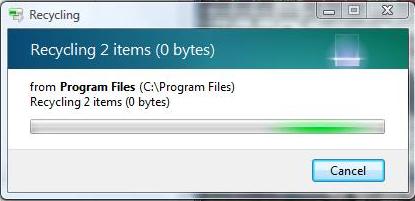
Today the world is raving (not really) about Windows 7’s multi-touch capabilities. Yet the overwhelming feeling I have about the latest Bill & Steve show is disappointment. I feel betrayed…abandoned. They created this turd Vista, then instead of fixing it they move on to the next thing. I’m left behind with this piece of junk. Incidentally, here’s another telling Vista screen, captured today:

You know, the famous Vista copy problem supposedly fixed in SP1. (OK, I realize this is deletion rather than copy, but it’s file manipulation nevertheless … I assume it’s the same problem)

I really wasn’t kidding when I said:

Windows 7, whenever it comes, should be released as “Vista Finalâ€, free to all Vista victims along with Microsoft’s letter of apology.

Read more here: Between the Lines, ParisLemon, CNET News.com, All about Microsoft, InfoWorld, InformationWeek, Gizmodo, GottaBeMobile, VentureBeat, Outside the Lines, WinExtra, Scobleizer, TechCrunch, The Inquisitr, The Secret Diary of Steve Jobs …etc…etc.

Zemanta Pixie

Tags: , , , , , ,

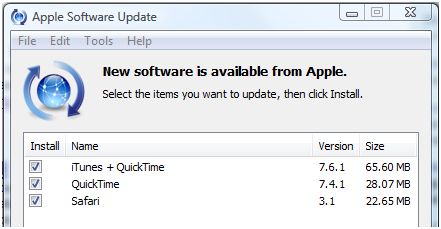
Oh, this is hilarious.  All the brouhaha about Apple being aggressive / sneaky … trying to install the Safari browser via Apple Update:

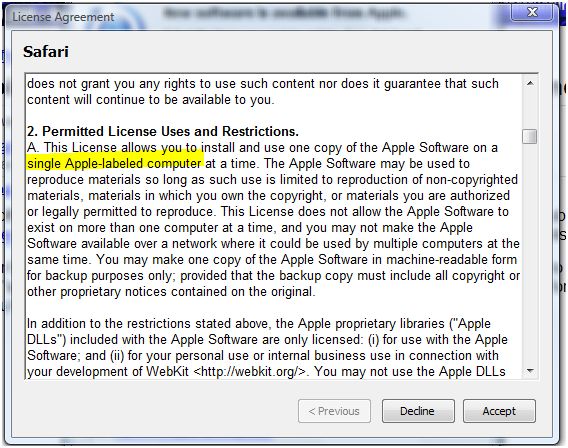
Well, now we know thanks to The Register that it was just a test.  They wanted to see if you abide by the legal terms:

Yes, you agree to only use it on Apple computers.  And if you took the bait and installed Safari on your Windows PC, expect the Apple lawyers anytime.  (OK, not reallysmile_tongue).


Update: The Apple Software Update points to this page, a list of all Apple software licences, where, digging a little we find these two documents:

The text in the Update program is clearly taken from the License for Mac, the Windows version of the file uses brand-neutral language, just mentioning “computer owned or controlled by you”.


Related posts: Hardware 2.0, 9 to 5 Mac, Ryan Stewart, CNetArs Technica and Channel Register.

Tags: , , , , , , , , ,

I’ve been observing an annoying trend on TechMeme for a while now: when a good discussion happens over the weekend, obviously some writers will miss it – then they sleep on it, come back to it a few days later and TechMeme picks it up as a new theme.

That’s what we’re seeing today with ZDNet blogger Ed Bott coming back to the Apple Update brouhaha and trying to place Microsoft on a morel higher ground.

In summary, the issue was that the Apple iTunes update program all of a sudden wanted to install the Safari browser on Windows PC’s and had it as the preselected default. That’s certified bad behavior. Even worse is the fact that it’s not new at all – a fact missed by almost all but yours truly. I pointed out that:

  • the same update program has been trying to install iTunes on a Windows machine where I don’t have it, don’t need it forever, despite unselecting it every single time
  • the update runs because I do have Quicktime installed, and Quicktime itself is as aggressive as it gets, re-installing itself in the XP systray no matter how many times you remove it.

To me this was all about respecting users choice or not. But the discussion went the “wrong way”:

  • Apple fans are a religious cult who came in hordes to defend Holy Apple. (before you chastise me, just look at how often I point to Apple as a better choice, without becoming blindly faithful)
  • Most debate focused on whether Firefox or Safari is the better browser (IE dully ignored) – nice tactics to change the subject…

And now here comes Ed Bott with a provocative title: What Microsoft can teach Apple about software updates:

For the record, I think Apple is dead wrong in the way it’s gone about using its iPod monopoly to expand its share in another market.

Right.

Ironically, an excellent model for how this update program should work already exists. It’s called Windows Update, and it embodies all the principles that Apple should follow.

Dead wrong.

I can’t believe anyone in their right mind would quote Windows Update, known for delivering patches that mess up one’s system only to be patched again and again as the ideal model to follow. One does not have to go too far, just look at the reports on systems disabled by the recent Vista SP1 update. The worlds richest company could not put a decent operating system together in five years, and a full year later the best they can deliver is a botched update!

But since Ed takes the opportunity to place Microsoft on the moral high ground in general, let’s not forget about another recent Microsoft update coup:

The windows live installer, released last September while offered an opt-out screen like Apple does now, then proceeded to install Windows Desktop Search, without ever asking for permission or even notifying the user.

Not only this was outrageously bad practice, completely ignoring the users right to decide what they want on their computers, it was also performance degrading, especially on systems that already had another desktop search installed (see system bar above).

So back to Ed Bott: yes, I condemn Apple’s latest move, but please, please, never in a million years would I think of setting Microsoft as the model to follow.


Update:  This window just popped up on my system:

Windows Firewall blocked Foldershare – a Microsoft product, which just got updated a few days ago. Only (?) problem is, I have (I should have) Windows Firewall turned off, since McAfee is installed, too.  WTF is this message?  Or has Win Firewall been turned on by some update, without asking me?   And why is it my job to investigate?


Related posts: Inner Exception, Tom Raftery’s Social Media and ParisLemon

Tags: , , , , , , , , , , , ,

Theme Tweaker by Unreal