Evernote Celebrates Birthday by Joining the Billion Dollar Club (Really?)
Personal Productivity June 27th, 2011
OK, so back then Evernote was really nothing more than a scrawny little note-taker, with a weird scrolling tape metaphor that was hard to get used to, but it already showed unusual flexibility of mixing typed and handwritten text with imaging. Still, the key benefit was price, compared to Microsoft Onenote. It’s hard to compete with free.
I was truly surprised by the news of their first funding round. Here’s my offending post from 2006 (hm, before they even existed, if you believe the birthday news…):
EverNote – Love You and Hate You
EverNote is the last company I expected to raise venture funding: has a mature product, a mix of freeware and a $35 version, and I pretty much considered them a good candidate for safe, organic growth. GigaOM just reported it EverNote’s funding to the tune of $6M. Wow…
My Love & Hate relationship? The love part is easy to understand; it’s a handy, easy-to-use notetaker, which I prefer to the comparable Microsoft OneNote, and the $0 price is quite unbeatable. The hate part: it really does not fit into strategy of moving off the desktop into the Cloud.
In fact it’s the only application that breaks my sync efforts between two laptops using FolderShare:
Tags: android, bubble, CloudAve, entrepreneurship, evernote, iPhone, microsoft, mobility, onenote, productivity, vc Funding
Gmail, Don’t be a Yahoo!
Software November 5th, 2010
In the 90’s I used to laugh at friends who all used Yahoo! as their personal email service. I did not understand how anyone could put up with the slow speeds of web-mail, and tried to convince them to install a decent email client, like Outlook, which is what most of them used in their corporate jobs.
Then things changed: Outlook grew into a bloated monster, it brought otherwise fairly speedy computers to a grinding halt and finding stuff in the archives of years of email became a gargantuan job. A new web-based email service came to rescue: Gmail was fast, well-organized, included productivity-boosters like labels and conversation-threading, and most importantly, you could not only search but also find old email in seconds! For this former Outlook-fan the switch was a no-brainer – in fact I ended up ditching almost all desktop software, moving online. (Gmail for mail and Zoho for most other tasks).
Life was good, I stayed productive and Gmail grew into a suite of productivity services by Google. Too bad it’s breaking down – again…
Tags: CloudAve, gmail, Google, google apps, hotmail, Outlook, performance, productivity, yahoo, zoho, zoho mail
GOutlook. Gmail Back to Earth… in Search of Revenue.
Personal Productivity September 29th, 2010
I’ve been long-time Gmail fan, having used it from the very early days, for almost 5 years now. The key reasons why I switched and have stuck with the service ever since were the productivity boosters, first of all:
- Threaded conversations
- Labels
- Search
Google did to email what all new product teams should: throw away all known concepts, start from fresh, figure our what the system should really do, instead of delivering a customary system with minor improvements. Instant success. Instant Customers. No, correct that: instant users. There is a difference. Apparently not everyone likes “radically new”.

Tags: CloudAve, email, folders, gmail, Google, labels, Microsoft Outlook, productivity, search, zoho
This morning I’ve been testing TweetDeck’s new super-fast version, based on the new Twitter User Streams API. TweetDeck provides fair warning:
This is a VERY experimental version of TweetDeck
I saw a few small glitches, but nothing major. Yet I am in trouble, and it’s not because of the product. It’s me. My brain…
The new TweetDeck (and I suspect soon all clients adapting the User Streams API) is fast. Bloody fast. As close to real-time as it gets. Here’s a quick comparison of Seesmic Desktop 2 and the new TweetDeck:
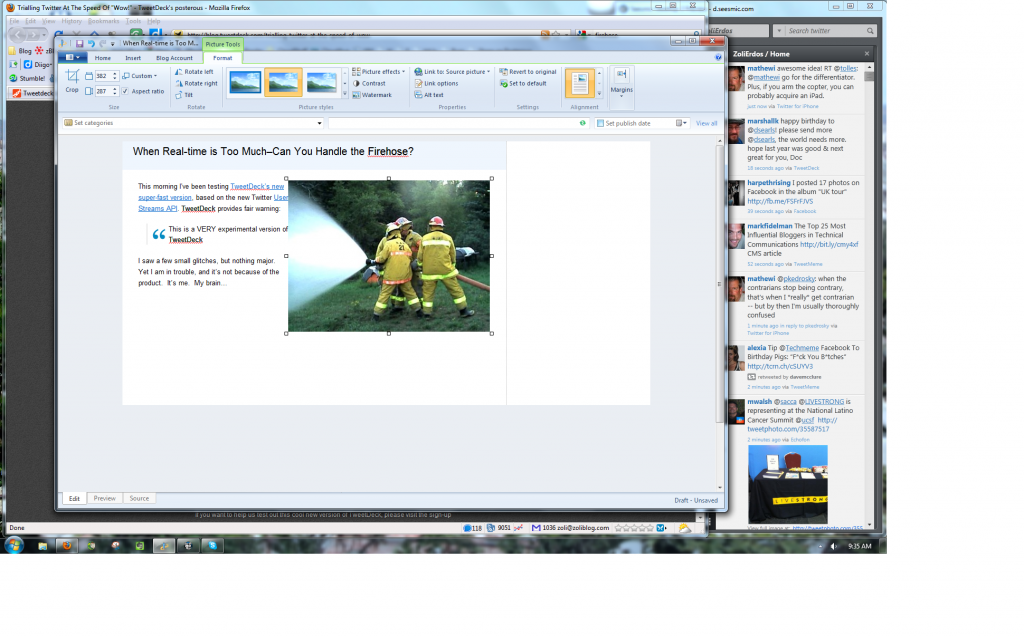
Seesmic in the left, white column, TweetDeck in the right, black one. Tweetdeck wins the race hands-down (note: this is not a comparison of the applications, but the API-s they use). It gets everything first. And therein lies the rub. I’m not sure real-time is always what we need. This is like drinking from a huge firehose, without taking a break. It can be suffocating – unless monitoring Twitter is what you do full time. Here’s my computer screen, while I am typing this very post:
I have a single column for Twitter on the right edge, but my eyes are not glued to it. I can focus on work, but notice the periodic screen updates in my peripheral vision, can quickly glance over to see if there’s anything noteworthy, and continue working. That’s how far my continuously divided attention can spread. The new TweetDeck does not give me that 30-second to a minute break to focus on work. It’s in constant motion, updates come in tweet by tweet, not in batches, and I find my eyes glued to it. It’s a productivity killer.
If I am live-tweeting during a conference, the firehose is what I want: set up TweetDeck with multiple columns, allow it to occupy the entire screen – in that environment I want absolute real-time. But for most of my productive life, I need those split minutes undisturbed. I turned off the firehose.
Update: The video does not fully support my point. As luck would have it I recorded a slower minute or so. But it can become dizzying under heavy Twitter traffic:-)
Tags: api, attention stream, CloudAve, firehose, information overload, productivity, real-time, river, seesmic, split attention, stream, tweedeck, Twitter, user stream api
I’ve been long-time Gmail fan, having used it from the very early days, for almost 5 years now. The key reasons why I switched and have stuck with the service ever since were the productivity boosters, first of all:
- Threaded conversations
- Labels
- Search
I also must say that for all other Web Office needs I prefer ( and always have) Zoho’s products. Now, take that with a grain of salt, I do have a bias, since Zoho are is the exclusive Sponsor of CloudAve, my main blogging gig, and before launching CloudAve, I had been a long-time Zoho Advisor. Being an Advisor is a controversial role: sometimes your Clients listen, sometimes they don’t.
I must admit for a long time I was going nuts trying to convince Zoho to throw out most of their email product and radically revamp it to offer Gmail-like benefits, mostly threaded conversations. Why didn’t they get it? I was frustrated. But the two things happened. I looked at the email (both Zoho and Gmail ) accounts of several people and was surprised that even the Gmail version showed only 1-2-3 items in a thread. My folders labels
are full of threads with 30+ entries each. I’m a productivity-maniac freelancer, part of a few hyper-active discussion group, but not everyone’s usage pattern is like mine…
In fact I also had to realize that I don’t really represent Zoho’s paying customer base. Sure, freelancers, bloggers..etc can generate a lot of hype and get enthusiastic about change, but the real money is in those “boring” businesses that are willing to pay, but don’t really want to change. Corporate employees live in Outlook, whether they like it or not is almost irrelevant, they (or their employers) resent change. So Zoho decidedly resisted turning everything upside down, staying “boring” for a long while, because this is what customers told them to do. (Zoho has this strange philosophy about business: they don’t want to be coolest company. Just a profitable one.
)
Of course over time they added conversation threads and labels, albeit implemented less radically than Gmail – it’s a mix, you can have either traditional or conversation views, and both labels and folders. But this story is not about Zoho – it’s about Gmail. Funny changes are happening in Gmail-land. They added folders, then improved them. Not that it makes a lot of difference – while for some it is a religious war, I’ve always said:
All folders are labels, but not all labels are folders.
Really. Read the details here. And now Henry Blodget reports: Google To Change Gmail, Add “Normal Email” Option Instead Of Just “Conversations”.
OMG! Is that the End of the World, or what? Not really… I suppose it’s all about financial realities and what the real world wants: you can be innovator, but if you want to sell, you better listen to your customers. (For clarification: customers are those who pay. That’s not me
). Welcome back to Earth, Gmail! I for one am happy the “new” old way is just an option and conversations remain, otherwise I’d have to switch again – and switching is a major pain.

Tags: CloudAve, conversation threads, conversation view, email, folders, gmail, Google, Henry Blodget, labels, productivity, zoho
Gmail’s Undo Send Isn’t Really Undo, Just Like Multiple Inboxes Were Not Really Multiple Inboxes
Personal Productivity, SaaS March 19th, 2009
First of all, I love Gmail, it’s my one-and-only email system. And I’m certainly glad to see the ever accelerating rate of enhancements, whether “official” or just the Labs variety. But oh, please, can we have some control here and call features what they really are?
First there was the multiple inboxes announcement. Nice. Except that it wasn’t. Multiple inboxes, that is. Think about it: that would defy logic – unless we’re talking about handling multiple email accounts, which is clearly not the case with Gmail. This feature is multi-pane viewing – no more, no less.
Today we’re getting another new feature: Undo Send. Except that it really isn’t. Undo Send, that is.
Undo Send is what Outlook has offered for ages: you can actually recall a message that had already been sent, provided the recipient has not opened it yet, and you’re both on Exchange. What Gmail offers now is a momentary delay of 5 seconds, during which you may just realize you’re emailing the wrong Smith or Brown, and hit the panic Undo button. It’s not really undo, since the message was never sent in the first place – Gmail was holding it for 5 seconds, if you had enabled this option.
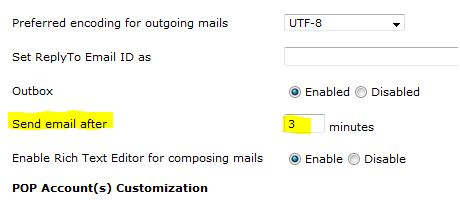
Of course, as just about all TechCrunch commenters note, 5 seconds is not enough, the delay might as well be configurable. Something like this:

Oh, I forgot. It’s from that other Web-mail system (the one that actually has multiple inboxes, too).
Update: MG Siegler over @ VentureBeat agrees this is not real unsend, and he remembers AOL had a real unsend/recall feature, just like the Exchange theme I described above.
Update #2: Oh, please… per Wired, Google already plans configurability, but all you get to pick is 5 or 10 seconds.
Related posts:
- Take it back: Gmail gets ‘Undo Send’ Labs feature
- A button to avoid a Gmail embarrassment
- Immediately regret that decision? Unsend it in Gmail.
Tags: aol, email, Exchange, gmail, ms exchange, Outlook, productivity, zoho mail
Gmail Themes Go Beyond Cosmetics
Personal Productivity, SaaS November 19th, 2008
I couldn’t care less when Gmail added those cute smiley, but the newly released themes go beyond cosmetics, they can actually increase your productivity. How? By helping you differentiate between multiple Gmail accounts.
I have branded (Google Apps, using my own domain) accounts for business and personal use, and a few generic @gmail.com types for subscriptions, lists, online purchases. It’s all neatly tied together by Gmail Manager, the excellent Firefox extension. Even then I sometimes find myself typing an email in the wrong account window. Here’s the solution: give all your Gmail accounts its own distinctive theme.
I don’t really care for the fancy themes, but at least the top row are all subtle, minimalist styles. Pick one for each of your accounts, you’ll get used to the colors fast and never mix up your accounts again.
Well.. almost. As usual, Google rolled out this new feature to the generic, @gmail.com accounts only. Google Apps users will have to wait – lets’ hope not too long.
Related articles:
- Spice up your inbox with colors and themes
- Gmail Gets Themes
- Gmail Themes. That’s Totally Ninja.
- Gmail Themes as Productivity Tools?

Tags: gmail, Google, productivity, skins, themes
Yotify – an Almost Impressive Personal Alert service
Personal Productivity, Startups September 24th, 2008
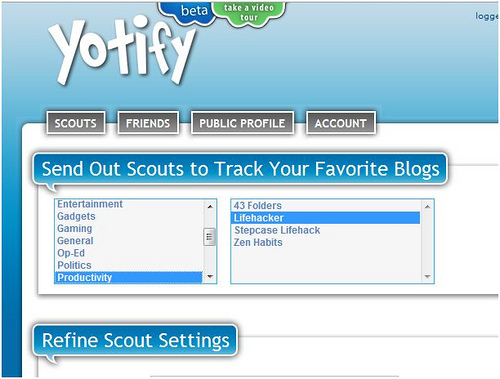
Reading that TechCrunch calls Yotify “Google Alerts on Steroids” I had great expectations… that did not last long. For now, it’s a no-go… read my quick review on CloudAve.
Related articles by Zemanta
- Yotify Launches Its "Google Alerts On Steroids"
- Concierge-Style Search Service Yotify Launches
- Stop Searching The Web – Let Yotify Do It For You
- Yotify Can’t Really Notify – Yet
Tags: concierge, google alerts, personal search, productivity, search, Startups, yotify

Zoho is mostly known for their Web-based productivity and business software, but sometimes they venture into … hmm…
) 
Gmail Changes![Reblog this post [with Zemanta]](http://www.zoliblog.com/wordpress/wp-content/uploads/HLIC/54e6a3db43b098ecbf5db09e027cb1c1.png)

Zoli Erdos