Yes, this is the one (Last) uber-super secure system you trust with ALL your passwords. Ouch. But d
espite the hacking, LastPass says users who had a strong master password in the first place are still safe (and they are forcing users to change that master password now).
I’m not a security expert and don’t pretend to be one, so all you can get from me is some ramblings from a business user:
Most of us are at an even higher risk every day: statistics show that over 60% of Internet users
have a favorite set of login credentials …
So iTunes got hacked and some users saw unauthorized purchases up to $600 in their accounts.
I’m shocked. Not at the fact that iTunes got hacked, but that users exposed their credit accounts to such extent. Websites do get hacked, it’s a fact of life. Users need to change their passwords, consider what other sites may get compromised, and generally think of getting more secure password management schemes – but it’s all too late. Why not protect your credit card in the first place?
You don’t ever have to submit your credit card number online.
No, I’m not saying give up the convenience of online purchases – just don’t use your real credit card number. I haven’t, for at least a decade. Instead I’ve always used Citbank’s Virtual Credit Card Numbers. It allows me to generate an ad-hoc credit card number for a specific vendor, either for one-time use or for a period of time with a dollar limit.
There are many other use cases, not just theft / hacking: think of all those subscriptions you just can’t cancel… they keep on billing, and you can’t just shut down the offending vendor, your only choice is canceling the credit card itself. A major pain. With a virtual number you go online and remove the particular vendor’s instance.
I’ve been living in the secure world of virtual credit cards for a long time, and simply took it for granted it’s the norm by now – I’m really shocked to see now how few providers offer it. All I could find (at least in the US) was Citi, Bank of America, Discover, and there was a half-cooked attempt by PayPal, first called virtual debit card, then secure card, but I believe it is now discontinued.
Shame on the Financial Services industry, throw-away credit cards should be the online standard in 2010. I’m not advocating any particular service (Citi’s implementation – the software side – is outright shabby, but the safety is worth it) but it might be worth signing up for one of these services just for the sake of safe online purchases.
Tags: Apple, bank of america, bofa, citi, citibank, CloudAve, credit cards, fraud, hackers, hacking, iTunes, online commerce, online shopping, paypal, secure card, security, virtual credit card
Oh, just what the Doctor has ordered: more junk food coming your way, left and right, from the social network that’s taking over the Internet: Facebook. McDonald’s will be the first advertiser taking advantage of Facebook’s soon-t0-be-releasing location feature.
The first reaction from most is this will kill leading location-based services: Hey Foursquare, Time To Close That Round Of Funding Before Facebook Chops Off Your Head. Yes, probably true, but now I am more worried about Facebook users – all of us – then businesses, and not just as a defender of healthier diets. Greasy or not, it’s not the ads that worry my, it’s yet another level of thoughtless surrender we’ll soon be committing: broadcasting our location every step of the way.
Yes, I realize there may be social benefits from bumping into friends via Foursquare Facebook, but have you really considered the danger of letting the world know where you are every step of the way? While you think about it, also consider just whose hands you leave all that data in: not exactly the champions of privacy.
The Relationship Between Facebook and Privacy: It’s Really Complicated says Mathew Ingram @ GigaOM this morning, and I strongly disagree. There is nothing complicated about it. Facebook does not give a *** about privacy: it’s a concept CEO Mark Zuckerberg finds obsolete, simply does not believe in at all. Now, in reality, even Facebook caves in to demands of privacy, but they are either careless or incompetent, or both, plugging one security hole after another.
Three strikes and you’re out – I guess Facebook is exempt from that law, now that they are becoming the New Internet.
But people are actually worried about privacy implications to consider quitting Facebook entirely: 10 Reasons To Delete Your Facebook Account. It’s a post worth reading in full, here are just the headings:
10. Facebook’s Terms Of Service are completely one-sided
9. Facebook’s CEO has a documented history of unethical behavior
8. Facebook has flat out declared war on privacy.
7. Facebook is pulling a classic bait-and-switch
6. Facebook is a bully
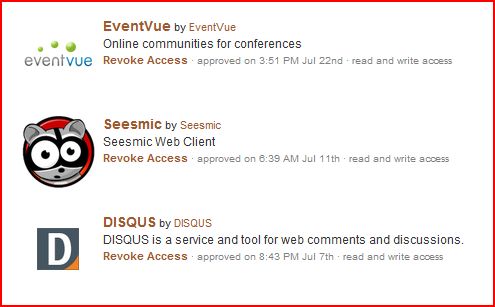
5. Even your private data is shared with applications (you are no longer trusting Facebook, but the Facebook ecosystem).
4. Facebook is not technically competent enough to be trusted.
3. Facebook makes it incredibly difficult to truly delete your account.
2. Facebook doesn’t (really) support the Open Web.
1. The Facebook application itself sucks.
I must admit for all my grumpiness I have not deleted my account, and I likely will not (not that it would be easy ). I resisted joining Facebook in the first place, was probably a year or so late, and even when I joined, I created a separate email account just for FB, and disallowed saving any Facebook cookies (remember Beacon? ). But resistance became just too inconvenient… so now I am in. That said I am not particularly active on Facebook, hardly maintain my profile and generally my presence there is a mess (this is where my marketing friends can jump in chastizing me for the lost opportunity). I’m only sticking around because Facebook has proven to be too pervasive, it is everywhere and (almost) everyone is on it. So yes, it is great to find long-lost friends and even discover some new ones. But that’s all for me, and I seriously suggest you all reconsider the level of your presence.
And even if you are very disciplined in your Facebook usage (are you?) read #5 above again. Just yesterday I was setting up my shiny new Android phone: I decided to enable location information, for the benefit of Google Maps and other really useful services. But… but..but … I am also tweeting and communicating in a zillion other ways from that same device, and although I will try to be careful about reviewing the permissions of every single app, it’s likely I will slip sooner or later.
So think about this: in this API-driven intertwined ecosystem of mobile and web services, just how certain can you be that Facebook (and others) won’t get information you never intend to give them in the first place, no matter how careful (you think) you are?
Updates:
Tags: android, CloudAve, facebook, foursquare, gowalla, location, mobility, privacy, security, Twitter
Well, well, hours after telling you not to change passwords, now I am telling you to change it… but this time with good reason. Minutes ago I’ve received a email from Atlassian:
We are sending you this message because we experienced a security breach and suspect that your Atlassian customer account password details (only) may have been compromised.
It is very unlikely that an unauthorised user has had the opportunity to log in to your account so far and if they have, there is very little in the way of personal information which could have been accessed. However, to minimise any further risk to your Atlassian account being compromised, we strongly recommend that you change your Atlassian account password as soon as possible using the procedure below.
Be aware that this security issue only affects Atlassian customers who created an Atlassian account and purchased one of our products before June 2008. Since then, we have been using a more secure user management system based on Atlassian’s Crowd product. When you change your Atlassian account password using the procedure below, your Atlassian customer account details will be stored in our updated Crowd user management system, which will further minimise the chance of a security breach occurring in future.
Procedure for changing your Atlassian customer account password:
1) Login to http://my.atlassian.com
2) Click “My Profile” (3rd tab)
3) Click “Change Password” (in Contact Information section)
4) Update your password to a new value
Atlassian apologises for the inconvenience caused. However, this is an extremely rare event for us and since we take security issues seriously, we are taking every precaution possible to minimise the effects of this security breach.Sincerely/Best regards,
Glenn Butcher
Director of IT
Not fun .. and I expect to we’ll hear more from Atlassian soon. For now they are obviously figthing whatever it is – status update from Twitter:
Atlassian had a security breach. Apologies for the confusion. Our site is experiencing heavy loads. We are working on getting back up ASAP.
Personally I am safe – I don’t have active accounts, just decided to help push Atlassian’s charity towards the finish line by purchasing 10 licences, but if you do, time to change the passwords…
Update: co-Founder and co-CEO Mike Cannon-Brookes posted the details on the Atlassian blog.
Apparently an old, inactive database table that had already been migrated in July 2008 to the secure Crowd identity management system was not deleted mistakenly. That indirectly answers the speculation about Atlassian passwords being stored in plain text format. They are not – anymore, but they used to be, prior to July 2008.
Mike goes on to detail what was / was not compromised: read for changes, they are resetting potentially compromised account passwords now.
He does not BS, owns up the mistake:
We made a big error. For this we are, of course, extremely sorry. The legacy customer database, with passwords stored in plain text, was a liability. Even though it wasn’t active, it should have been deleted. There’s no logical explanation for why it wasn’t, other than as we moved off one project, and on to the next one, we dropped the ball and screwed up.
They are still investigating what happened and Mike promises full disclosure, coming this week.
It’s been a bad day for Atlassian and some of their customers – but I’m glad they live up to their “Open Company, No Bullshit” slogan, and respond as expected.
Tags: atlassian, charity, CloudAve, Collaboration, confluence, Crowd, jira, Password, security, wiki
The Password Conundrum
Software April 12th, 2010
I’m not a security expert and don’t pretend to be one, but half-cooked advice on fundamental security issues p***es me off big time. Today it’s a lengthy article at the Boston Globe: Please do not change your password.
It’s based on a study by a Microsoft researcher, who concludes that regularly changing passwords is a big waste of time – so far so good and I’ve just saved you reading 3 pages –but what’s the conclusion?
- Use strong, bullet-proof passwords in the first place
- Use updated security software, don’t install unknown stuff to avoid keyloggers
It all makes sense, except that it’s hard to do. Statistics show that over 60% of Internet users have a favorite set of login credentials and they use that single set across many systems. Very-very dangerous, but the reason we do it is that this is what we can remember easily.
The missing piece from the advice is how we deal with the “bullet-proof” and unique set of login credentials we create on dozens of systems we need to log in. Some people will develop a formula to make up such passwords – too bad such patterns are often recognizable. Others will write them down … ouch!
So we’re left with two options:
- physical devices, be it lists, passcode cards, USB sticks..etc, what if you lose them?
- password management systems like Keypass, Lastpass, Passspack, Syferlock… – what if they get compromised?
What’s your solution?
Related posts:
- LastPass – So Good I’ll Dismiss Any Concern
- SyferLock Almost Solves The Password Security Problem
- Wake Up People, It’s More than Just Your Twitter Password
- Mandatory Password Changes Costs Billions in Lost Productivity [Passwords]
- Changing Your Password – Security Measure Or Pure Nonsense? You Decide (lockergnome.com)

Tags: CloudAve, keypass, lastpass, login, passpack, Password, security, syferlock
Malware Attack on Skype
Software January 18th, 2010
I’m used to Skype Spam, but not a malvare-attack. Here’s what just popped up on my Skype screen:
Registry Online: URGENT SYSTEM SCAN NOTIFICATION ! PLEASE READ CAREFULLY !!
For the link to become active, please click on ‘Add to contacts’ skype button or type it in manually into your web browser !
FULL DETAILS OF SCAN RESULT BELOW
****************************************WINDOWS REQUIRES IMMEDIATE ATTENTION
ATTENTION ! Security Center has detected
malware on your computer !Affected Software:
Microsoft Windows Vista
Microsoft Windows XP
Microsoft Windows 2000
Microsoft Windows Server 2003Impact of Vulnerability: Remote Code Execution / Virus Infection /
Unexpected shutdownsRecommendation: Users running vulnerable version should install a repair utility immediately
Your system IS affected, download the patch from the address below !
Failure to do so may result in severe computer malfunction.For the link to become active, please click on ‘Add to contacts’ skype button or type it in manually into your web browser!
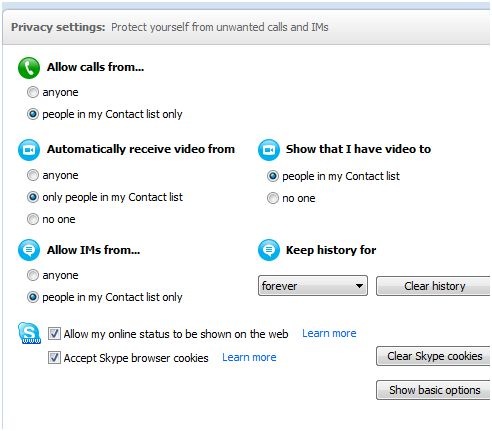
Now, I don’t ever click on suspicious links (I bet this is a rogue one) from unknown sources, but I’m afraid people might fall for it. Also, how come Skype allows strande IM’s through when my security setting is “Contacts only” ? And of course if you’re not careful enough and follow the request to add the scammer as a contact, then they will get through even easier next time. Beware: don’t click, Block and Report the sender!
Tags: CloudAve, malware, security, skype, skype attack, skype security
Zoho Office for Sharepoint: Use SaaS, Keep Data Behind the Firewall
Collaboration, Enterprise Software, SaaS June 23rd, 2009
One of the major roadblocks to SaaS providers’ entry to the enterprise is IT and Business concerns about corporate security, thinking of the firewall as the last line of defense.
Microsoft SharePoint has a very strong position in the Enterprise as the incumbents behind-the-firewall collaboration server, and for years smart Collaboration and Social Software vendors with better functionality, like Atlassian, Socialtext, Jive Software, Newsgator have been "playing well", adopting their services to SharePoint.
Now Zoho joins, announcing Zoho Office for Microsoft SharePoint, which combines the benefits of a collaborative SaaS Suite with the (perceived or real?) security if keeping data behind the firewall.
Tags: Collaboration, Exchange, firewall, Google, microsoft, ms office, Outlook, SaaS, security, sharepoint, zoho, zoho suite
Skype Spam
Software June 22nd, 2009
The last place I expect to receive spam is on Skype, and so far it has remained clean, I assume due to my privacy settings:
So how on earth could this have popped up on my screen:
[12:05:42 PM] Zora Giannoni: hi! i’m briannahh from http://www.slutsdating.com are we still on for saturday?
No, Zora, or Briannah or whoever you are: we’re not on. Anyone with similar experience? Are we seeing major trouble with Skype?


Zoli Erdos