Your Computers Are Slowly Killing Themselves
SaaS, Technology November 14th, 2008
How old is your work computer? – asks the Wall Street Journal.
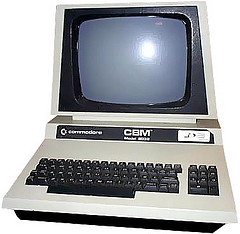
Mine is a year-and-a half old. The dual-core former screamer (obviously not the one the the pic to the right) has become an average slow machine now that quad-core is the standard, but I could not care less. I don’t need a faster, bigger computer for work, in fact not even for video-conferencing or watching movies.
In fact I (and most of us) don’t even need 1-2 year-old computers, either, now that browser is the computer.
Now, you’ve heard this a zillion times, but let me present another side: the more you use your computers, the slower they get. In fact it gets worse: you don’t even have to use your computers, they get slower by themselves.
Why, and more importantly, what’s the solution? Read the full article on CloudAve – while at it, might as well grab the feed here. ![]()
Tags: computer upgrade, dual-core, gmail, Google, hardware, laptop, mcafee, netbook, notebook, pc, quad-core, security, virus-scan, Web Applications, zoho
Netbooks or Notebooks? It’s Not Only About Size.
Technology November 3rd, 2008
Hardly a day goes by without another new Netbook announcement, at lower and lower prices. The first baby eee PC by ASUS was toy-like ( I returned it after a day), but the current crop are quite usable mobile computing devices.
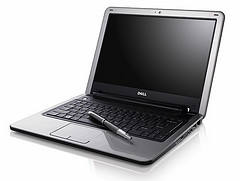
These new Netbooks are flying off the shelf, so much so that sometimes you wonder if manufacturers rush to re-label their notebooks to netbooks, just to ride the wave. Whereas the first model had a puny 7” screen, the current standard is a minimum of 8.9, but 10” is becoming widely available, and when Dell recently announced their Inspiron Mini 12, ZDNet’s Larry Dignan rightfully noted that the netbook-notebook-laptop lines have just become blurry.
Dell’s divider line may very well be at the 12” screen size, considering anything beyond that a notebook. ASUS CEO Jerry Shen clearly draws the line at 10” – a definition that fits his own eee PC line. I think all these size-based definitions are meaningless. Size truly matters, but for another reason: when you pick a travel n*tbook, you clearly need something small and lightweight, yet with a decent keyboard and screen. But that’s not what differentiates Netbooks from any other computer.
The real divider is how you use it. A Netbook is a light mobile computing device that allows you to process information, access the Internet, and that does not store a bundle of bloated programs or data.
When computers first became personal, most of us only got one at the workplace, then years later the family PC appeared– one expensive computer shared by the entire family. Now we often have individual PC’s for just about anyone at home, including the kids, and are moving to a new pattern, where individuals will have a number of purpose-oriented computing devices, be it a desktop, workhorse laptop, netbook or smartphone. The fundamental change is that we’re not really working on the computer itself, but on the Net: the computer (keyboard, screen) is just our way to access the net. As Coding Horror’s Jeff Atwood says in The Web Browser is the New Laptop :
After spending some time with a netbook, I realized that calling them "small laptops" is a mistake. Netbooks are an entirely different breed of animal. They are cheap, portable web browsers.
We’re getting to the point where for most productivity task the computer’s performance or even the operating system won’t matter anymore: all we need is a decent screen and keyboard to get online.
But computer manufacturers while jumping on this hot new trend, seem to be confused. Minor flavors aside they typically offer two major configurations:
- The uber-geek netbook:
- Linux
- Solid-state drive (SSD)
- For the rest of the world:
- Windows XP
- Traditional hard drive
That’s not a very smart combination, if you ask me. Statistics show the return rate of Linux vs. Windows based netbooks is 4 to 1. Buyers of the cute little netbooks are happy first, then they become frustrated that they can’t instantly do things they are used to – and a learning curve with a $400 $200 device is unacceptable. Let’s face it, Linux is not friendly enough for most non-geeks – including yours truly. But why can I not have a netbook with XP and SSD?
Typical netbook SSD’s are still in the 8-16GB range, while harddisks are up to 160GB. That’s a trap that vendor themselves fall into: my sexy little netbook (an Acer Aspire One) came loaded with crapware, including trial versions of MS Office, MS Works, Intervideo WinDVD (on a DVD-less computer!) and who knows what else. Once the pattern is established, and you have large storage, you will start installing your own programs and data, too, the temptation is just too hard to resist. You no longer have a netbook, it just became a noteboook.
The New York Times ran an article this week: In Age of Impatience, Cutting Computer Start Time, discussing the problem of slow boot times. Anyone who ever had a Windows computer knows this tends to get worse over time. My own Vista desktop had a sub-minute startup time a year ago when new, not it takes 3-4 minute to boot it. The two older XP-based laptops take 6-7 minutes to reboot. This well-known Windows disease can only be cured by refreshing your system from time to time. It’s an ugly process, requires wiping out your harddisk’s content, re-installing Windows, then your programs and data. PC manufacturers don’t exactly help by providing “restore disks” instead of proper OS CD’s: why would you start with a pre- SP1 copy of WinXP and reinstall a bunch of years-old obsolete crapware when the objective was to cleanup your system in the first place?

If you want to avoid the pain, keep your netbook free of applications and data: use it as a NETbook, and it will stay nimble and fast (sort of).
Talk about fast, there’s a neat solution to reduce boot-up time: Splashtop, a quick-load platform by startup company DeviceVM can put you online within seconds, without loading the main operating system. Chances are you’d be using it 80% of the time, relegating full Windows to an as-needed basis. DeviceVM charges manufacturers about $1 per system, so why is it that it’s often found in high-end notebooks, but not in the netbooks by the same manufacturer? Splashtop should be a must on any netbook.
Finally, a word on connectivity and prices: Wifi gets you online almost, but not all the time, so obviously a 3G connection is a useful addition to your netbook. But you will pay for 3G data usage, so why don’t carriers subsidize your netbook purchase, like they do with cell phones? The day will come, as the WSJ reports, HP may be one of the first to introduce such a model: H-P Mulls Service Bundles for Netbooks. When that happens, your notebook will not be too different from a smartphone, just with a larger keyboard and display.

(Cross-posted from CloudAve.)
Related articles by Zemanta
- Spashtop joins Lenovo to unveil Instant-On Netbook
- Lightweight Windows 7 pre-Beta on Eee PC 1000H looks very promising
- Asustek expects to ship US$200 Eee PC in 2009, says president
- Asus expects $200 Eee PC Netbook in 2009
- Want a $200 Eee PC? You only have to wait till next year
- Linux to Ship on More Desktops than Windows
- Linux: Coming soon to a Windows laptop near you
- Why Netbooks Will Soon Cost $99
- Netbooks are just going to get better
Tags: acer, asus, bloatware, crapware, dell, devicevm, HP, lenovo, linux, mobility, netbooks, notebooks, online, splashtop, Web Applications, web office, Windows, winxp
Life After Outlook: Gmail. But is it Becoming Oopsmail?
Personal Productivity, SaaS August 1st, 2008
Bernard’s title @ ReadWriteWeb, Breaking Free of Outlook perfectly matches my own sentiment: in fact I called the MS Client Outlook-prison repeatedly.
Unlike Bernard, I escaped from prison in stages:
- First Using Gmail to boost non-gmail productivity
- Next using Gmail servers with my own domain but still in the Outlook client
- Finally breaking entirely free, using Gmail natively (web interface). This was part of a bigger move, ditching almost all desktop software, moving online. (Gmail for mail and Zoho for most other tasks)
I’ve never looked back, and am definitely more productive than in my desktop-bound life. I could see first-hand a lot of people move in the same direction: my How to Import All Your Archive Email Into Gmail guide become an all-time classic, probably approaching 100,000 hits by now. Gmail’s IMAP support changed everything, so I issued a Simplified Guide to Importing All Your Archive Email Into Gmail. A while later Google woke up, and started to offer a migration tool to subscribers of the paid Google Apps version. (Oh, and they are being sued by LimitNone, who claims Google basically stole their gMove product).
But the love-affair with Gmail was not without trouble: I first documented some glitches last spring: Gmail, I Love You – Don’t Let Me Down, then real trouble started a month ort so ago.
Formerly rock-solid Gmail has been ill a lot lately. The “Oops…the system encountered a problem (#500) – Retrying in 1:30” error message has became a daily occurance… in fact several times a day.

I somewhat jokingly called “retry now” Gmail’s Penalty Button, when I noticed every time I hit it the wait counter increased by a minute.
Now I have an update: you don’t need the penalty button, the counter increases by itself. Every time, “reliably”. Basically as soon as you see the Oops error, you might as well close the browser tab (or browser itself), as it won’t recover on its own. This annoying error has become the most frequent “feature” of Gmail, to the extent that it really undermines productivity.
I hope Google will fix it. They MUST. It’s the crown jewel of Google Apps. In fact without Gmail and Calendar there wouldn’t be Google Apps at all.
Update: Oops: apparently there’s a real service by the name of Oopsmail. Obviously I am not referrring to them in the title. (Although… ?
)
Related articles by Zemanta
- Google Mail is flagging my Outbound Mail in Google Apps!
- Google Guns at Microsoft with Email Migration API
- Gmail’s Limitations for Sending Messages
- Does Your Gmail Suck Too?
- Gmail and small business
- Microsoft Outlook and the Enterprise
Tags: desktop, desktop applications, Exchange, gmail, gmail import, Google, migration, Outlook, Web Applications, web office, zoho
SaaS and the Shifting Software Business Model
Collaboration, ERP / CRM, Personal Productivity, SaaS May 28th, 2008
Barely two years ago we debated whether little-known Zoho was worth paying attention to. The majority view was that their Office applications were weak contenders that would never challenge the Microsoft suite’s position. I think I was in the minority stating that I really did not need more than 10-20% of Word or Excel’s functionality, but online-anywhere access and collaboration made the switch worthwhile.
Today Robert Scoble reports he is seeing online applications wherever he turns:
Today I’d say the skill set is shifting once again. This time to something like Zoho Writer or Google’s Docs. Because if you visit Fast Company’s offices in New York, for instance, they want to work with you on your copy in live time. Fast Fast Fast is the word of the day. It’s in our title, after all. Now some people still use Word, but last time I was there one of the editors told me he was moving everything over to Google’s Docs because it let him work with his authors much more effectively.
These are no longer yesterday’s wannabe applications. Zoho Sheet recently added Macro and Pivot Table support , going way beyond the average user’s needs (and certainly exceeding my spreadsheet skills, which are stuck somewhere at the Lotus 1-2-3 level). Zoho Writer today added an equation editor and LaTex support. Heck, I don’t even know latex from silicone, what is it doing in my editor? ![]()
As I found out it’s important for Zoho’s academic and student users, once again, going way beyond an average user’s needs. (the other update today is mass import from Google Docs: nice, special delivery for Dennis, but I still would like to see a list of all my online docs, be it Zoho or Google, open them, edit them, and save to whichever format (and storage) I want to.)
Online applications have arrived, they’ve become feature-rich, powerful, and are the way software will be consumed in the future. They also change the business landscape.
Software margins choked by the cloud? – asks Matt Assay at CNet, pointing out a shift in Microsoft’s tone about cloud computing, recognizing that in the future they will host apps for a majority of their customers, and that their margins will seriously decline:
There’s not a chance in Hades that Microsoft will be able to charge more for its cloud-based offerings–not when its competitors are using the cloud to pummel its desktop and server-based offerings. This is something that Microsoft (and everyone else) is simply going to have to get used to. The go-go days of outrageous software margins are over. Done.
Matt cites Nick Carr who in turn recently discussed
…the different economics of providing software as a Web service and the aggressive pricing strategies of cloud pioneers like Google, Zoho, and Amazon.
This is fellow Enterprise Irregular Larry Dignan’s key take-away from the Bill & Steve show, too:
Microsoft CEO Steve Ballmer acknowledged the fact that a lot of computing is happening in the browser and not in applications. He also said that the future of software will have “a much more balanced computational model” and that Microsoft will have to compromise.
Of course it isn’t just Office. The obvious business application is CRM, where Salesforce.com pioneered the concept and delivered the first On-demand product. But now a funny thing is happening: the pioneer is increasingly being replaced by more inexpensive competitors, including my Client, Zoho. Yes, SaaS disrupts the traditional software market, but there’s another equally important trend happening: the commoditization of software.
Commoditization is beneficial to customers, but a death-spiral to (most) vendors. Except for the few that drive commoditization. Zoho makes no secret of doing exactly that.
Tags: business model, cloud computing, commoditization, crm, excel, microsoft, On-Demand, SaaS, salesforce.com, Software, Web Applications, word, zoho, zoho crm, zoho sheet, zoho writer
TechCrunch Releases New Zoho Service: Invoice
SMB / SME, SaaS March 27th, 2008
Yes, the title isn’t a mistake: TechCrunch is no longer just powerful media, Mike now can single-handedly release new products.
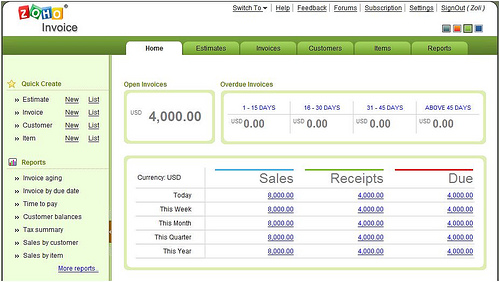

. Today I spent several hours testing a pre-release product, Zoho Invoice, which was a few weeks from it’s planned launch, when TechCrunch accidentally posted the news. The Zoho Team decided to play along, and instead of disappointing TC readers with a broken link, opted to release the product immediately.
Not exactly an orderly Launch, but not the end of the world either, especially not for Zoho, which has a reputation of updating their web-based products frequently. In my early testing today I found Invoice easy to use, with a soothing, pleasant UI where all the icons are in the right place and support the right information flow. There are some features that were still under consideration as of this afternoon – so be it, this is a “forced” early release, updates and fixes will no doubt be coming soon (using the Feedback button at the top will help issues get fixed quickly).
So what do we have here? Essentially a billing application, that allows the user to create /import Clients, define items (product/service), generate estimates, convert them to invoice and accept payment against it. The Home screen is a Dashboard, providing a quick financial overview:

Information flows easily from one document to another, and there are a number of predefined (customizable) templates that can generate notification emails to the Customer at any stage. Notice the icons change on these two bars:


The Estimate (emailed or snail-mailed to the Customer) can be converted to an Invoice, but when displaying an Invoice, there’s a new icon there to enable entering a payment received.
There are transactional detail, summary, aging ..etc reports to help keep tight control of your receivables.
Although Zoho is primarily known for being the best Web-based Office / Productivity Suite provider, they are not exactly new to transactional business systems: their longest standing product is Zoho CRM (which is an understated name for a mini-ERP), the recently announced Zoho People, and a more full-featured Accounting system is in the works, too. Talk about CRM, it already has some Invoice functionality, which will later be replaced by the new module, to be integrated with CRM. For now, Zoho Invoice is integrated with Projects.
The slideshow below explains the setup, various functions and the workflow between them (click the lower right corner to switch to full-screen):
The new billing application is free up to 5 invoices a months, and there is a pricing scale depending on the number of invoices per month, from $5 incl. 25 invoices to $35 up to 1500 invoices.

The two notable competitors are BlinkSale and FreshBooks. Zoho will no doubt build on the fact that Invoice is just one piece in the puzzle of 16 or so business applications it has to offer.
(Disclaimer: I am an Advisor to Zoho)
Related posts: Webware.com, Enterprise Alley, Venture Beat, Zoho Blogs,
Related articles by Zemanta
- 7 Online Invoicing Apps for Freelancers
- Importing data from Blinksale to Zoho Invoice
- FreshBooks – Helping SMBs Ride Out the Storm

Tags: billing, blinksale, business software, crm, freshbooks, SaaS, smb, Web Applications, zoho, zoho crm, zoho invoice
The Cell-Phone Aware PC May Be a PC-less PC
SaaS, Technology March 8th, 2008
Mike Egan @ Computerworld makes the case for PC’s to be smarter, with improved awareness of cell-phones, which means of their owners.
PCs would benefit greatly from awareness about the location of the user. Is she sitting in front of me? Is she out of the building? Imagine if your PC performed routine maintenance, or kicked into security mode when it knew you weren’t around. Since we take them wherever we go, cell phones are ideal devices to inform our PCs whether we’re in the room or not.
We like to set up our PCs just so, with color schemes and specific files and applications we like to use. Imagine if our phones could carry sets of configurations around and magically transform any PC we happen to be using into one set up just like the computer at home or in the office.
We work on documents, then go home and work on them some more. Why don’t phones automatically carry the latest version and upload it to whichever PC we’re using? Why do most of us still use e-mail for this?
A recent Gartner study discusses similar concepts named “Portable Personality Solutions.” Whether the media is thumb drives as in the Gartner study, or cell phones as in Egan’s vision, the core idea is the same: your preferences, your “digital personality” is always with you in your device, and is uploaded and downloaded wirelessly and automatically to whatever computer you want to use.
I like the concept, but it involves unnecessary steps: far too many uploads and downloads, a sure sign that it’s based on today’s computing model, instead of tomorrow’s. I laid out a similar but more far-reaching concept last year:
- the mobile phone brings the connectivity, browser and some personalization
- the actual work devices are the cheap displays, keyboards easily found anywhere.
- the apps and data are on the Net
Can you spot the key difference? There is no computer. Yes, the PC is gone, the display and keyboard are there for convenience reasons (who doesn’t like large displays?) the mobile device can do the minimal processing I need since the heavy workload is carried in the Cloud. Granted this is not the solution for 3-D Modeling, Video Editing and the like, just for regular productivity work, which is what most of us use computers for anyway.
Now, to be fair, this is not really my concept, I was just interpreting Zoho CEO Sridhar Vembu’s personal computing nirvana vision. Recently he developed his vision a step further (actually, it’s not him dreaming further, it’s the technology that advances fast):
Given how mobile phones pack a whole lot of functionality in a tiny package, I have wondered if the ideal server farm is just tens of thousands of mobile phones packed together. It seems to me that the semiconductor technology behind mobile devices is far, far more power efficient than the stuff that goes in servers. Partly it is a backwards compatibility issue, with servers having to run code written all the way back to 1980s, while mobile phones simply didn’t exist that far back. Partly, it is also a function of how traditional client-server applications were architectural monoliths, compared to the deeply distributed “service-oriented architecture” that is common in web applications today.
With mobile phones approaching very respectable CPU & memory capacity, packaging them together as a server cluster makes a lot of sense. Linux can run on almost all of the modern CPUs common in cell-phones, and the mobile version of Java seems actually well-suited for server use, particularly for deeply partitioned, distributed applications. Lightweightness is actually an advantage in server software, just as it is in mobile software.
I wonder how far-fetched this vision is, but have to say this former Qualcomm engineer who just spent a few millions of dollars to create two data centers which will soon provide automatic failover might just know what he is talking about… ![]()
Update: “Spanning Sync” Charlie is thinking along similar lines: Will Your Next PC be an iPhone?
Update (4/13): Is it Time For a Portable Dumb Terminal?
Tags: cellular, cloud computing, digital personality, location awareness, mobile awareness, mobility, portability, portable personality, SaaS, server farm, servers, synchronization, Web Applications, zoho
JotSpot Born Again as Google Sites, the Wiki-less Wiki.
Collaboration, Personal Productivity, SaaS February 28th, 2008
Three weeks ago I speculated that JotSpot, the user-friendly wiki swallowed by Google a year and a half ago would soon come out of hibernation, and Voila! here it is, rebranded as Google Sites. It is the first service only available as part of Google Apps (including the free version), although I had some difficulty accessing it. Under “Manage this Domain” I could add “Sites” as a new service, but it did not show up on my account as an accessible application. When I typed sites.google.com it wanted me to sign up for Google Apps even though I was already logged in to my account. Of course trying to do so resulted in the error message:
Google Apps for zoliblog.com has already been registered by your domain administrator. Please contact your admin directly to get access to Google Apps services.
Catch 22. But there’s a solution: just type the direct URL (sites.google.com/a/yourdomain.com as default, or customize it to your liking) and you can get into Sites. I’m sure Google will soon add it to the Apps menu. (Sidenote: my old JotSpot account is still alive at name.jot.com).
Google no longer calls this a wiki, which I think is a good move. I previously wrote:
Wikis have arrived when …you don’t even have to know what they are to use one. You don’t have to know you’re using a wiki, just happily type away, creating shareable content on the Web.
I was discussing Wetpaint, the user friendly, wiki-less wiki there, and I think it’s smart of Google to follow that pattern… more later, but first, under the hood it is still a wiki, so let’s examine some of the wiki basics.
The interface is familiar from good old JotSpot (as a sidenote, the old JotSpot accounts are still alive at name.jot.com). There’s a basic wysiwyg editor, the Edit button is large and visible, and so is the New Page button. Good old JotSpot had several more ways of creating new pages, which are gone – perhaps for the best:
- WikiWords or CamelCase: in old JotSpot anything you typed with embedded capitalization became a link to a page. As a relatively early wiki-user I liked it, as the easiest way to LinkAsYouThink. But in the Web 2.0 age we keep on bastardizing grammar writing EveryThingLikeThis, so more and more WikiWords had to be “unlinked”… too much confusion, especially for the new generation of mainstream users.
- Linking to a shell-page before it’s created. This was a useful feature, even if we eliminate camelcase, I could use the “Link” icon, and mark up text as a link to a new sub-page, to be filled with content later. Again, this supports flow-thinking, or LinkAsYouThink, which I regret is gone.
- The “New Page” button. This is the only remaining option in Google Sites, and I think the fact that it offers to pick a parent page (enforced hierarchy) is an improvement. No more orphan pages, yet relatively flexible hierarchy.
For those not too familiar with wiki terms, I discuss some of these concepts in more detail here: technically an article on SocialText 2.0, but I often make comparisons to JotSpot and Atlassian’s Confluence.
I’m glad to see Sites retained breadcrumbs for easier navigation, and they added sitemaps, a tree-style view of all your pages. This could be improved to allow for drag-and-drop style moving of the pages (changing the hierarchy), like Zoho Wiki does.
I’m surprised Sites still does not have inbound links: this is a critical feature for all wikis, whatever we call them. A wiki is all about associating pieces of information with each other, and the inbound link, also referred to as backlink shows you where the information on the current page is used elsewhere. The JotSpot tea half-recognized the importance of backlinks, as they were available as as a downloadable plugin on the Jot Development wiki, but never made it to the standard feature-set, and are apparently lost in the Google reincarnation, at least for now.
Attachment handling is as good as it was in the original JotSpot: it maintains previous versions, allows users to revert to earlier ones…etc. However, Google missed a huge chance here to by not offering to convert the attached documents to its own Google Docs style. This point takes us to the next level: stepping outside the boundaries of a standalone wiki and using it as a facility to pull together data created by other applications.
Last year I said after burying JotSpot for a year, Google can’t just release it as a wiki, instead:
…I hope that means they rethought everything and integrated JotSpot well into a number of offerings.
- It could provide for much better document management than the current Docs & Spreadsheets UI.
- It overlaps with Page Creator, also with the simplified version found in Google Groups – in fact Groups which is no longer just email lists but a rudimentary collaboration platform and JotSpot could very well be merged / integrated.
- Finally JotSpot tried to provide primitive applications (spreadsheet, calendar..etc) all of which have a better Google counterpart, so one would hope they will be replaced, too.
Well, what’s the score on that prediction? Google Sites is a better replacement for Page Creator, Google ditched the JotSpot “apps”, replacing them with their own ones – so far 2 scores out of 3. As for document management.. well, I’d say half a score, or less. (Hey, that’s 2.5 out of 3
)
You can somewhat integrate Google Docs (which includes documents, spreadsheets and presentations) by embedding them into any Google Sites page. You have to enter the specific URL though – why not just select from a list? Furthermore, your Google docs or spreadsheets have to be first made public and you have to use the public URL to embed them into Sites. Here’s my test site, showing first an error message, then the actual embedded spreadsheet, after I made it public.
The embedded docs appear properly in the saved page, but I can’t click on it, not even in Edit mode to get to the source. In fact in Edit mode all I see is a graphical placeholder for the embedded doc.
How about sharing / collaboration? As expected, your Sites can be:
- private
- public
- shared with individual email id’s
- shared with everyone within your domain
…and you can set view or edit options for all those levels. However, Google missed a big chance again. As a complete coincidence, it’s only yesterday that I raved about Zoho’s Group level sharing, half-announced in a fairly understated manner – hidden in a list of Zoho Writer enhancements. Well, Google already has a very good group facility: Google Groups, which started it’s life as a group discussion / forum system, but it gradually evolved into a decent collaboration platform. Once I have a “group” defined (i.e. the list of members), why doesn’t it become an entity I can share my wiki (sites) or docs with? When I invite users to share the wiki with, there’s an option to save the list as group, but I don’t know where it disappears, can not pull it up either within the wiki or gmail, or docs.
Finally there are gadgets, but if you read Dennis Howlett at ZDNet, gadgets might the feature you don’t want to touch with a ten-foot pole. ![]()
Summary: Nice to have Jot back (even if we did not get GSpot.
) Google now has a pretty good and easy web-page creator with some wiki features made user-friendly, and a half-hearted attempt at integrating the rest of the Apps empire using Sites. Perhaps they get it right in the next release.
Related posts: TechCrunch, eWeek, Ross Mayfield’s Weblog, Irregular Enterprise, Mashable!, InfoWorld, Between the Lines, Portals and KM, CNet, Webware, GigaOM, Web Worker Daily, Venture Chronicles, Insider Chatter, Learning and Technology, Solo Technology.
Tags: Collaboration, document management, flow, Google, google apps, google Groups, google sites, google wiki, gspot, Integration, Jotspot, Web Applications, wiki, zoho wiki
Web Forms Gain Popularity
Collaboration, SaaS, Startups February 7th, 2008
Web forms are increasingly popular, as they provide an easy way to solicit user input, manage a database in the background, and display data in a controlled form. Typical uses are contact forms (this blog has one), surveys, signup-sheets. Wufoo is perhaps the most popular standalone form builder, but as popular as they are, Google’s entry to the space will likely bring more visibility to Web form use cases.
I set up a very rudimentary web form to demonstrate their use, but I am cheating: I took the data from Google Operating System and populated my database – sorry, Ionut, I don’t get anywhere close to your huge reader base.
Please fill out the form below.
Although the form captures the time of entry, I am not displaying it below, to demonstrate that once can control the re-use of data after user entry.
You can manipulate the above data, filter it, sort it by clicking on the column headers, search the contents…etc.
Oh… is this more than you’ve seen on the other Google forms? And they’ve told you the lists were not embeddable? Sorry .. I’m cheating: I’ve re-created Ionut’s form in Zoho Creator.
(Disclaimer: I am an Advisor to Zoho – but I am making a point by doing this.)
Different people will always prefer different tools. I don’t have any statistics, but I would assume the number of users for database-like tools (MS Access, Dabble DB, Zoho Creator & DB) is by an order of magnitude less than the number of spreadsheet users. A lot of basic spreadsheet users don’t perform calculations, don’t use pivot tables – they just create tables to track lists. (See my earlier rant on why JotSpot’s tracker is not a real spreadsheet). For their sake it’s nice to be able to have simple form support inside a spreadsheet, which is what they can now get from Google.
Several reviewers of the new Google Forms were missing field verification, calculated numeric fields…etc. These features and more are supported in Zoho Creator, which in fact allows you to build mini-apps by dropping script elements, without actually coding. Those who want more database manipulation can use Zoho DB. These are powerful applications, but which one to use when can be confusing to less technically inclined users (like yours truly). Hence simple forms in a spreadsheet are a good idea. But let me dream a little – here’s how I’d like to see web-based collaboration some day:
It won’t be about formats and applications – it will be about free-flowing thoughts and the data encapsulating them. Of course there will be differences in application capabilities, but it’s entirely likely that what you can manipulate in your database application, I will access using a spreadsheet. Likewise, I may write something in a wiki, and you want to edit it in an online word processor. It’s not a dream, we’re heading that way. For example Zoho’s wiki and Writer apps share a basically similar editor, Zoho DB introduced pivot tables which will show up in Sheet in the near future. I am impatient, would like to see this sharing happen faster, but have to accept the realities of how the leading Web companies work: individual products first, integration later. But we’ll get there… to the vision of format-less web-collaboration.
Oh, and until then, Welcome Creator Mini Google Forms.![]()
Related posts: Rev2.org, Download Squad, Digital Trends, Sunny Talks Tech, Webware.com, Compiler, Search Engine Roundtable, Googlified, Search Engine Journal, CenterNetworks, Google Operating System, TechCrunch, Google Blogoscoped, SEO and Tech Daily, Lifehacker, Gear Diary and Techmamas
Tags: data analysis, data query, databases, excel, Google, google apps, google forms, google spreadsheet, ms access, online database, pivot table, spreadsheets, sql, Web Applications, web office, webform, wufoo, zoho, zoho creator, zoho db
Windows XP Twice as Fast as Vista?
Software, Technology November 24th, 2007
Ouch. This hurts. Devil Mountain Software, the outfit that had previously declared Vista SP1 a Performance Dud came to the conclusion that Windows XP SP3 Yields Performance Gains – about 10% compared to XP SP2. That’s the good news. The bad news is that the very same tests show the outgoing operating system, XP twice as fast as Vista, the “flagship” OS. No wonder Forrester Research says Vista’s biggest problem is XP. ![]()

Of course most users won’t notice it. Why? Because very few upgrade their existing computers from XP to Vista. We don’t buy operating systems, we buy computers: try to get one without Vista. (Fact: most of Microsoft’s Vista Revenue comes from the OEM channel.)
The Vista-based new screamer clearly runs a lot faster than the 3-year-old laptop running XP, but in reality it’s running at half-speed – the other half eaten by the Operating System. Which proves my earlier argument abut this being a pointless arms race: buying faster and faster machines only so they can maintain themselves and barely let us use basic applications.
Unless those applications are in the cloud. ![]()
Related posts: PC World, Hardware 2.0 and TECH.BLORGE.com
Update (12/14): Coding Sanity has found a solution.
Tags: cloud computing, desktop software, microsoft, vista, vista performance, vistasucks, Web Applications, Windows, windows vista, windows xp, xp
What is Glue?
I’ve discussed earlier how 


Zoli Erdos