
Netbooks or Notebooks? It’s Not Only About Size.
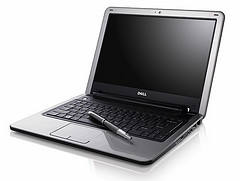 Hardly a day goes by without another new Netbook announcement, at lower and lower prices. The first baby eee PC by ASUS was toy-like ( I returned it after a day), but the current crop are quite usable mobile computing devices.
These new Netbooks are flying off the shelf, so much so that sometimes you wonder if manufacturers rush to re-label their notebooks to netbooks, just to ride the wave. Whereas the first model had a puny 7” screen, the current standard is a minimum of 8.9, but 10” is becoming widely available, and when Dell recently announced their Inspiron Mini 12, ZDNet’s Larry Dignan rightfully noted that the netbook-notebook-laptop lines have just become blurry.
Dell’s divider line may very well be at the 12” screen size, considering anything beyond that a notebook. ASUS CEO Jerry Shen clearly draws the line at 10” – a definition that fits his own eee PC line. I think all these size-based definitions are meaningless. Size truly matters, but for another reason: when you pick a travel n*tbook, you clearly need something small and lightweight, yet with a decent keyboard and screen. But that’s not what differentiates Netbooks from any other computer.
The real divider is how you use it. A Netbook is a light mobile computing device that allows you to process information, access the Internet, and that does not store a bundle of bloated programs or data.
When computers first became personal, most of us only got one at the workplace, then years later the family PC appeared– one expensive computer shared by the entire family. Now we often have individual PC’s for just about anyone at home, including the kids, and are moving to a new pattern, where individuals will have a number of purpose-oriented computing devices, be it a desktop, workhorse laptop, netbook or smartphone. The fundamental change is that we’re not really working on the computer itself, but on the Net: the computer (keyboard, screen) is just our way to access the net. As Coding Horror’s Jeff Atwood says in The Web Browser is the New Laptop :
After spending some time with a netbook, I realized that calling them "small laptops" is a mistake. Netbooks are an entirely different breed of animal. They are cheap, portable web browsers.
We’re getting to the point where for most productivity task the computer’s performance or even the operating system won’t matter anymore: all we need is a decent screen and keyboard to get online.
But computer manufacturers while jumping on this hot new trend, seem to be confused. Minor flavors aside they typically offer two major configurations:
- The uber-geek netbook:
- Linux
- Solid-state drive (SSD)
- For the rest of the world:
- Windows XP
- Traditional hard drive
That’s not a very smart combination, if you ask me. Statistics show the return rate of Linux vs. Windows based netbooks is 4 to 1. Buyers of the cute little netbooks are happy first, then they become frustrated that they can’t instantly do things they are used to – and a learning curve with a $400 $200 device is unacceptable. Let’s face it, Linux is not friendly enough for most non-geeks – including yours truly. But why can I not have a netbook with XP and SSD?
Typical netbook SSD’s are still in the 8-16GB range, while harddisks are up to 160GB. That’s a trap that vendor themselves fall into: my sexy little netbook (an Acer Aspire One) came loaded with crapware, including trial versions of MS Office, MS Works, Intervideo WinDVD (on a DVD-less computer!) and who knows what else. Once the pattern is established, and you have large storage, you will start installing your own programs and data, too, the temptation is just too hard to resist. You no longer have a netbook, it just became a noteboook.
 The New York Times ran an article this week: In Age of Impatience, Cutting Computer Start Time, discussing the problem of slow boot times. Anyone who ever had a Windows computer knows this tends to get worse over time. My own Vista desktop had a sub-minute startup time a year ago when new, not it takes 3-4 minute to boot it. The two older XP-based laptops take 6-7 minutes to reboot. This well-known Windows disease can only be cured by refreshing your system from time to time. It’s an ugly process, requires wiping out your harddisk’s content, re-installing Windows, then your programs and data. PC manufacturers don’t exactly help by providing “restore disks” instead of proper OS CD’s: why would you start with a pre- SP1 copy of WinXP and reinstall a bunch of years-old obsolete crapware when the objective was to cleanup your system in the first place?
If you want to avoid the pain, keep your netbook free of applications and data: use it as a NETbook, and it will stay nimble and fast (sort of).
Talk about fast, there’s a neat solution to reduce boot-up time: Splashtop, a quick-load platform by startup company DeviceVM can put you online within seconds, without loading the main operating system. Chances are you’d be using it 80% of the time, relegating full Windows to an as-needed basis. DeviceVM charges manufacturers about $1 per system, so why is it that it’s often found in high-end notebooks, but not in the netbooks by the same manufacturer? Splashtop should be a must on any netbook.
 Finally, a word on connectivity and prices: Wifi gets you online almost, but not all the time, so obviously a 3G connection is a useful addition to your netbook. But you will pay for 3G data usage, so why don’t carriers subsidize your netbook purchase, like they do with cell phones? The day will come, as the WSJ reports, HP may be one of the first to introduce such a model: H-P Mulls Service Bundles for Netbooks. When that happens, your notebook will not be too different from a smartphone, just with a larger keyboard and display.
(Cross-posted from CloudAve.)
Related articles by Zemanta
- Spashtop joins Lenovo to unveil Instant-On Netbook
- Lightweight Windows 7 pre-Beta on Eee PC 1000H looks very promising
- Asustek expects to ship US$200 Eee PC in 2009, says president
- Asus expects $200 Eee PC Netbook in 2009
- Want a $200 Eee PC? You only have to wait till next year
- Linux to Ship on More Desktops than Windows
- Linux: Coming soon to a Windows laptop near you
- Why Netbooks Will Soon Cost $99
- Netbooks are just going to get better
Ready for Vista Final? (Code-named Windows 7)
For two days in a row TechMeme was overflowing with Microsoft news coming out of PDC: Azure, Windows 7, Web Office (whatever the MS name will be). But on the very day that supposedly all belonged to Microsoft there was a stream of seemingly unrelated items on TechMeme all pointing in the same direction, none too good for Microsoft.
Joe Wilcox @ Microsoft Watch declared that Windows Vista No Longer Matters :
Contrary to ridiculous assertions recently made by Microsoft CEO Steve Ballmer, Windows Vista is a flop. If businesses aren’t buying Vista, after waiting six (now seven) years, it’s no success. Yet, during the last day of the Gartner 2008 expo 10 days ago, Steve asserted that Vista “has been extremely successful.”
Success in terms of revenue does not mean actual product acceptance. The fact is, most of the Vista revenue comes from consumers, not the corporate Market. Consumers don’t intentionally buy Vista, they buy computers: good luck trying to buy a system without Vista on it – unless it’s a Mac or the refreshingly new category of Netbooks. And if you cough up the extra $50-$99 most OEM’s charge you to “downgrade” to XP, it is still booked as a Vista sale! Like I’ve said before, don’t be blinded by Vista sales numbers. No wonder MS omitted the Vista licence count during last week’s earnings announcement.
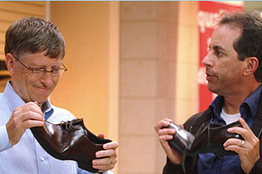 PDC has shown that Microsoft is now eager to forget about Vista, a bad dream, fully focusing on Windows 7. They must have realized that no multi-million-dollar marketing campaign can fix Vista’s badly tarnished reputation.
Where public opinion is more divided is whether this was just a perception issue, or actual product problems. Count me in the latter camp – no Mojave Experiment can convince me otherwise. The problem with Vista has never been appearance, or features as originally designed: it’s the zillions of inconsistencies, little things that fail every day turning us Vista-users into Vista-sufferers.
The stream of messages coming out of PDC appear to confirm this: it’s clear that Windows 7 does not mean major architectural, infrastructural changes – that’s what Vista did. Win7 is all about the user experience – in other words, putting the finishing touches on Vista. I said over a year ago: we don’t need another desktop OS. But I guess I am OK with Windows 7, provided Microsoft:
- Releases it as Vista Final (meaning it works)
- Provides it as a free update to Vista
- Attaches a letter of apology to all Vista victims (yeah, fat chances…)
Whether it’s Vista or Windows 7, almost doesn’t matter – it will likely be the last major desktop OS MS releases, and as such it represents the end of an era. Obviously Microsoft themselves recognizes it (finally!), this years PDC is all about moving to the Cloud, be it the Azure initiative, or the announcement of moving Office to the Web. (To be precise it’s the announcement of a future product announcement).
This trend will only be accelerated by the shift in what devices we use for our (cloud-based) computing needs. Time to Leave the Laptop Behind – says The Wall Street Journal, joined by Coding Horror’s Jeff Atwood who declares: The Web Browser is the New Laptop. Every day another Netbook is announced, at lower and lower prices, and they change how we access information forever. I’ll be devoting the next post to this subject, in the meantime leaving you with another post from Henry Blodget: Microsoft Windows: The Beginning of the End.
(Originally posted @ CloudAve)
Related articles by Zemanta
3-year Old Millionaires
 No, not talking about babies here, but two Tech icons who both reached the Million milestone around their third birthday.
TechCrunch, launched 3-year ago as Mike Arrington’s hobby blog had 1 million Feedburner subscribers for the first time last week. Of course it’s no longer a hobby blog, but a blog network run by a professional CEO, supported by a growing blogger team. Mike himself has become a Silicon Valley institution, his Atherton home Web 2.0 Central.
Congratulations, Mike! And Congrat’s to the other 3-year old millioinaire: Zoho.
When Zoho Writer launched three years ago it was the underdog compared to Writely (which later became Google Docs). But it improved week by week, was soon joined by Zoho Sheet, and one had to be blind not to  see the benefits of a complete Suite on the Net. Today Zoho has a million users, is recognized as a leader along with Google, has made inroads to the Enterprise (400K users at GE? Not bad…), The Economist calls them the force that will Deflate IT… a lot of achievements in three years.
Once again, congratulations to both… and now the race is on: who will reach the 2 Million mark first? 
Project Management 2.0 – What’s Wrong With 1.0?
Let me quickly state that I don’t really know what the consensus definition of PM 2.0 is, but I do have a feeling based on my very 1.0-style experience.
In the 90’s I worked on a number of fairly large scale SAP Projects in a variety of roles, including Project Manager, and supervisor of several other projects. The standard tool was Microsoft Project. It was used for:
- Planning a Project (initial Scoping)
- Selling it
- Periodic reporting to Steering Committee during the actual projects
What’s missing from the above? Well, how about using it to help the actual daily work of project team members?
Project team members did not even have access to MS Project, it only existed in a few copies on the PM and Team Lead’s computers. Information-flow was one-way: feed the beast to be able to occasionally print charts that look impressive (scary) enough that Steering Committee members won’t question it.
Ok, I am admittedly sarcastic, but the point is: PM 1.0 was all about planning, reporting and it served Management but did not help actual Project Execution.
My expectation of PM 2.0 would be that it helps all team members involved who can share information, collaborate on it and actually get clues from the system on where they are, where they should be, what their next step is, instead of just feeding the beast.
Is this the real promise of Project Management 2.0? I hope to find out from an excellent set of panelists that I have the honor of moderating at the Office 2.0 Conference next week:
- Andrew Filev (Wrike)
- Bruce Henry (LiquidPlanner)
- Mark Mader (Smartsheet.com)
- Guy Shani (Clarizen)
- Dean Carlson (Viewpath)
Of course this is just one of many exciting sessions – if you haven’t registered yet, you can grab a $100 discount by registering here. Oh, and don’t forget to visit us at the Zoho Party – the address is #1 Cloud Avenue. 
(This article is cross-posted at the Office 2.0 Conference Blog)
Office 2.0, a Most Irregular Conference – Get Your Discount Here

Nothing about the Office 2.0 Conference is even remotely ordinary.
Start with the organizer, Ismael Ghalimi, CEO of a VC-funded startup, Intalio. That’s normally a full-time job – not when it comes to Ismael: he is also a scuba-diving instructor, a pilot, launched Monolab|Workspace, (is that Incubator 2.0?), launched the Extreme Productivity Seminar series, oh, and have I mentioned the annual Office 2.0 Conference? ( I actually know his secret, he has two body doubles, I just haven’t been able to prove it yet)
Pressed for time he is turning a necessity into a virtue: year by year the Conference is a showcase of creating a successful event out of nothing in only two months. I remember the first event in 2006, when a couple of us Enterprise Irregulars were helping him plan the sessions only weeks away from the start. A few days and a few blog posts later Ismael got flooded with request for sponsor and speaking slots. This year history repeats itself: just a month ago the conference site was a placeholder and one could only wonder if … then a new site was born overnight, based on Jive Software’s excellent ClearSpace platform, and now it’s alive with user participation, sponsors, registration..etc.
What’s a Web-focused Conference without wi-fi? It’s a joke that in 2008 conferences, including brands like Web 2.0, Gnomedex …etc. still fail to provide sufficient connection. Ismael’s solution includes laser beams to the top of the building, another one down to a terrace, then inside – making it happen with Swisscom was quite a project in itself. Office 2.0 set the standard once and for all, anything less at major conferences is a failure.
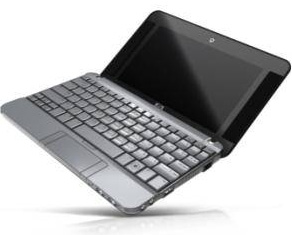 Then there’s the issue of The Gadget. I believe the iPod at the first conference was just more-then-generous swag. The iPhones handed out at the second conference had an integral part at the event: several applications released specifically for Office 2.0 allowed participants to interact with each other, navigate the schedule and find sessions. This time all paid participants will receive a the HP 2133 Mini-Note PC.
Yes, the conference swag is not pens, stickers or t-shirts: it’s a mini-computer, which cost about half the registration fee. It will clearly raise eyebrows, and many would prefer to skip the gadget and pay reduced fees. I think handing out such an expensive gadget will have an interesting effect on the conference demographic: we’ll likely see an increase of corporate employees, who can expense the entire conference and are less price-sensitive than startups and freelancers – the original Office 2.0 crowd.
But that may very well be what the conference needs. There’s a reason why this year’s theme is Enterprise Adoption. The Office 2.0 movement wouldn’t go very far with only the early pioneers, evangelists talking to themselves, dissmissing enterprise requirements. For the principles to become practice in business, we need a more balanced mix, and in a twisted way the gadget may just help achieve that.
Those who can’t afford the full registration are not entirely locked out: Socialtext CEO and top evangelist Ross Mayfield will facilitate Un-Conference 2.0 the day before the official conference, at a cost of $50.
Finally, startups have a chance to present the attending VCs, media, bloggers at LaunchPad – Ismael announced this event over the weekend, and already has 10 particpants – get in there while you can. Note to my (numerous) VC readers: I hope you will be there, too.
If you’re still hesitating, check out the Agenda, the list of Speakers, Media representatives, and if you haven’t done so, register now.
I’ve saved the best for last: don’t use the standard registration, save $100 by registering here.
Update: while I was typing here, fellow Enterprise Irregular Dennis Howlett explained why this is an Irregular (pun intended) Conference in more than one way. Update to the update: see Susan’s excellent summary.
(cross-posted on the Conference Blog)
What Are a Million Users Worth? Zoho Thinks a Lot.
 The first time I wrote about Zoho – the “Safer Office” they had less than 50 thousand users – not a lot for a web service. Today they announced having a million users – and that’s just direct Zoho users, not including those served by Baihui in China, or any other white label providers. Back then they had 3 products: Writer, Sheet and CRM – today the list includes 17 Applications, 5 Add-ons and 4 Utilities.
The chart below shows steady growth in monthly new registrations – the sudden spike in May is the effect of opening Zoho Apps to users with Google and Yahoo accounts.

Now, you may ask, what are a million users worth in the world of freebies? Web startups do go out of business not being able to monetize their popularity. Zoho’s story has been that Adventnet, the parent company with “boring” but reliable, cash-cow network management products is financing the “Zoho experience”. Well, here’s an update to that story: the Zoho brand itself has been self-sustaining for a while now.
While Zoho does not disclose numbers – it’s their prerogative, being a closely held private company – they apparently have paying users. The number one revenue generator is Zoho CRM, that they were asked to abandon in order to be allowed to join Salesforce.com’s Appexchange. Apparently they made the right decision, and instead of being relegated to providing an Office Suite only, they keep on adding business applications like Projects, Invoice, People, Meeting..etc. Incidentally, these apps are where Zoho makes their money.
The free Office and other apps with the million-or-so users are Zoho’s main marketing vehicle. As we often discussed here, they don’t have a Sales force, in fact they don’t “sell” as such: the products sell themselves. This trend will likely increase as Zoho now increasingly focuses on integrating existing services rather then just pumping out new ones.
That is not to say that the Office Suite can’t became a source of significant revenue, but perhaps from a less expected source: while Zoho strives to become the outsourced IT department for small businesses (SMB) they have seen a flurry of large enterprise inquiries recently. I am aware of ongoing projects with customers that even enterprise software giants SAP or Oracle would consider strategic, key accounts – let alone Microsoft. 
 As for the one millionth user: Zoho CRM user Dean Detton of Prestige Automation Inc has been invited to celebrate at the Zoho Party during the Office 2.0 Conference on September 4th.
The address for the party is: 1 Cloud Avenue. See you there! 
(Disclaimer: I am an Advisor to Zoho)
Related articles by Zemanta
- NetSuite, Zoho post app suite gains
- Zoho’s millions
- Zoho hits a million accounts with a superior product range


Life After Outlook: Gmail. But is it Becoming Oopsmail?
Bernard’s title @ ReadWriteWeb, Breaking Free of Outlook perfectly matches my own sentiment: in fact I called the MS Client Outlook-prison repeatedly.
Unlike Bernard, I escaped from prison in stages:
- First Using Gmail to boost non-gmail productivity
- Next using Gmail servers with my own domain but still in the Outlook client
- Finally breaking entirely free, using Gmail natively (web interface). This was part of a bigger move, ditching almost all desktop software, moving online. (Gmail for mail and Zoho for most other tasks)
I’ve never looked back, and am definitely more productive than in my desktop-bound life. I could see first-hand a lot of people move in the same direction: my How to Import All Your Archive Email Into Gmail guide become an all-time classic, probably approaching 100,000 hits by now. Gmail’s IMAP support changed everything, so I issued a Simplified Guide to Importing All Your Archive Email Into Gmail. A while later Google woke up, and started to offer a migration tool to subscribers of the paid Google Apps version. (Oh, and they are being sued by LimitNone, who claims Google basically stole their gMove product).
But the love-affair with Gmail was not without trouble: I first documented some glitches last spring: Gmail, I Love You – Don’t Let Me Down, then real trouble started a month ort so ago.
Formerly rock-solid Gmail has been ill a lot lately. The “Oops…the system encountered a problem (#500) – Retrying in 1:30” error message has became a daily occurance… in fact several times a day.

I somewhat jokingly called “retry now” Gmail’s Penalty Button, when I noticed every time I hit it the wait counter increased by a minute.
Now I have an update: you don’t need the penalty button, the counter increases by itself. Every time, “reliably”. Basically as soon as you see the Oops error, you might as well close the browser tab (or browser itself), as it won’t recover on its own. This annoying error has become the most frequent “feature” of Gmail, to the extent that it really undermines productivity.
I hope Google will fix it. They MUST. It’s the crown jewel of Google Apps. In fact without Gmail and Calendar there wouldn’t be Google Apps at all.
Update: Oops: apparently there’s a real service by the name of Oopsmail. Obviously I am not referrring to them in the title. (Although… ? 🙂 )
Related articles by Zemanta
- Google Mail is flagging my Outbound Mail in Google Apps!
- Google Guns at Microsoft with Email Migration API
- Gmail’s Limitations for Sending Messages
- Does Your Gmail Suck Too?
- Gmail and small business
- Microsoft Outlook and the Enterprise

Sync Update: Syncplicity, Dropbox, Windows Live (?) Mesh
 Quick update to my recent Syncplicity review:
In the meantime Microsoft’s Windows Live Mesh opened to the public, combining synhcronization and backup – also competing with their own Foldershare. Now a word on what will happen to Foldershare, but I guess the writing is on the wall. That said, Live Mesh just failed for me the second time, so I can’t really recommend it.
Another service, Dropbox is getting a lot of buzz nowadays, largely to a smart theme of giving out limited numbers of beta invitations. Apparently artificially created shortage is good marketing, bloggers LOVE being able to give away 10 or so invites…
 Dropbox has one advantage over Syncplicity: it’s multi-platform, including Apple’s OS X and Linux, whereas Syncplicity is Windows only for now. But that’s where it ends: it has less features (forget Web Apps integration, e.g. Google, Zoho, Scribd, Picnik), and has what I consider a huge flaw: you have to drop your files into a dedicated folder to be synchronized. That may be reasonable if you want to collaborate on a limited set of files, but it simply does not resolve the “access to all my data anywhere, anytime” problem. It’s certainly a show-stopper for me.
So if you’re waiting for a Dropbox invitation, you might as well try Syncplicity – you’ll love it. And if you sign up here, you get 1G more, i.e. 3G of free storage instead of the standard 2G.
Update: I received a very good, constructive comment from Assaf, who pointed out this was a largely negative post. In my mind this post is an extension of my original Syncplicity review, but now that I re-read it on it’s own, I agree with Assaf. Please read my response here, that makes this post complete.
Syncplicity: Simply Excellent Synchronization, Online Backup and More
(Updated)
In today’s world where features are hyped as products and project teams masquerade as companies it’s truly refreshing to see a service that’s almost an All-in-One (OK, perhaps Four-in-One) in it’s category, which I would loosely define as protecting, sharing and synchronizing one’s data.
Recently launched Syncplicity:
- Synchronizes your data across multiple computers a’la Foldershare
- Provides secure online backup a’la Mozy
- Facilitates easy online file sharing a’la box.net..etc
- Integrates with online services like Google, Zoho, Scribd, Picnik (somewhat like now defunct Docsyncer?)
An impressive list by all means. Oh, and congrat’s to the team for finding an available domain name that’s actually a perfect description of what they do. The simplicity part probably refers to the ease of installation and use not the task they perform in the background. .
Getting Started
Registration, installation of the client is quick and easy, more importantly, after the initial configuration you can forget about the software – it works for you in the background non-intrusively, allowing you peace of mind. You can leave it to Syncplicity to find all your document and media files or specify directories to be synchronized. The process allows more granular control than Foldershare, where one of my gripes was that if I select My Documents ( a fairly obvious choice), I cannot exempt subdirectories, which results in conflict with some stubborn programs (e.g. Evernote). With Syncplicity you can precisely fine-tune what you want synchronized, in fact they indicated that filename-based exclusion is in the development plan. (If you ever had your Picasa.ini files messed up by Foldershare, you know what I am talking about…)
 Synchronization
The major difference compared to Foldershare is that Syncplicity is not a peer-to-peer product: it actually uploads your files to their servers, where they are encrypted (AES-256) and are available either to the Syncplicity clients on your other computers, or directly, via a Web browser. This may be a show-stopper for some, and a convenience for others: unlike Foldershare, this approach does not require all synchronized computers to be online at the same time. And since the files are stored online, it might as well be used as a backup service – this is where we enter Mozy-land.
 Backup
The two major differences vs. Mozy are encryption and ease of restoring files from the backup set.
Mozy performs all encryption on your computer and even allows you to pick your private key: it can hardly be any safer (so safe, that if you lose the key, you’re files are gone forever). Syncplicity transmits your files using SSL and the AES 256-bit encryption occurs in their data center, using a random key that is then sent off to a different location. Since they hold the key, there’s definitely a trust issue to ponder here.
Of course a backup solution is only as good as the restore, and, unlike Mozy, which will send a zip file hours after your request, then to be decrypted on your PC, accessing your files with Syncplicity couldn’t be any simpler. Install the client on any PC and auto-download entire directories, or just browse the online version, check file revision history and pick what you’d like to download manually.
Sharing
Syncplicity offers both file and folder-level sharing: from your PC, right-click on any file to get a shareable link, which will allow anyone you email it to download the file from their website. Or share entire folders to any email address, and the receiving party can either browse the folder’s online version, or, if they have the Syncplicity client installed, you both will have identical copies on your computers. You can further specify view-only or edit access – the latter takes us into collaboration-land: updates made by any sharing party will be synchronized back to all other computers. Be aware though that each party will still work on individual copies prior to save/sync, so with long multiple edits it’s quite possible to end up with several versions of the same document, due to Syncplicity’s conflict resolution.
This is why I believe real-time online collaboration is superior: there’s only one master copy, and no confusion between revisions. This is what Google Docs and Zoho offer, and – surprise, surprise! – Syncplicity won’t let you down here, either.
They have created the best seamless offline/online integration I’ve seen with Google Docs: at the initial run your designated PC folder (e.g. My Documents) will get uploaded to your Google Docs account, and Google docs will be placed in a subdirectory on your computer. From this point on you can edit these documents using Google, Word, Excel ..etc – your offline and online versions will be kept in sync. This is pretty good, but not perfect: since Google docs only support a subset of the Word functions, after an online edit Syncplicity keeps two (and potentially more) versions of the same file – one with the latest changes, the other with a full set of Word functions “lost” in the conversion to Google.
Syncplicity’s most recently added online partners are:
- Zoho – Right-click for the ‘Edit in Zoho’ option. Saving updates the document both on your computer, Syncplicity, but NOT on Zoho and Zoho (fixed, that was fast)
- Scribd – iPaper view of your files on the desktop.
- Picnik – Right-click to choose “Edit in Picnik” for all your photos.
The Zoho integration presents a funny situation: you can now use Zoho Writer to save a file to your Google Docs space (Zoho>Desktop>Syncplicity>Google). Not sure how practical this is, but I like the irony of a third party creating Zoho>Google integration . On a more serious note, what I really would like to see is full Syncplicity<>Zoho integration, like it works with Google today (and since Zoho supports more Word functions, the conversion should be less lossy). And while on the wish-list, how about sync-ing to Flickr?
Is it for you?
First of all, pricing: Free for two computers and 2G space, $9.99/month or $99 annually for any number of computers and 40G of storage. You can sign up here to get 1G more, i.e. 3G of free storage, or 45G on paid accounts (using ZOLIBLOG as invitation code also works). The price-tag is clearly heftier than, say Mozy, or free Foldershare, but there’s a lot more functionality you get – and oh, boy, when did box.net become so expensive?
The one potential downside is the fact that Syncplicity is a pre-funding startup. Will they survive? This market has seen casualties (Docsyncer, Omnidrive?), successful exits (Mozy, Foldershare), and stable, ongoing services. The answer is: who knows? The Founders are ex-Microsofties, they’ve put an amazing service together in a very short time, so I’d put my chips on them, but in business there are no guarantees.
A better question to ask what you’re real risk is. If online backup is critically important to you, and are already paying for a service like Mozy, I wouldn’t abandon it yet (Mozy is now owned by EMC, not going anywhere). If you’re mostly just syncing currently, or don’t have a solid backup solution for now, there’s not much to lose. Even if Syncplicity were to disappear, your files will be replicated in several places, you don’t lose access.
In fact, by signing up, you help Syncplicity show traction, which is critical in the funding process, so you can help solidify their position. Happy Sync-ing!
Update (7/17): In the meantime Microsoft’s Windows Live Mesh opened to the public, combining synhcronization and backup – also competing with their own Foldershare. Now a word on what will happen to Foldershare, but I guess the writing is on the wall. That said, I Live Mesh just failed for me the second time, so I can’t really recommend it.
Another service, Dropbox is getting hyped a lot nowadays, largely to a smart theme of giving out limited numbers of invitations. Apparently artificially created shortage is good marketing, bloggers LOVE being able to give away 10 or so invites… Dropbox has one advantage over Syncplicity: it’s multi-platform, including Apple’s OS X and Linux, whereas Syncplicity is Windows only for now. But that’s where it ends: it has less features (forget Web Apps integration), and has what I consider a huge flaw: you have to drop your files into a dedicated folder to be synchronized. That may be reasonable if you want to collaborate on a limited set of files, but it simply does not resolve the “access to all myy data anywhere, anytime” problem. It’s certainly a show-stopper for me.
So if you’re waiting for a Dropbox invitation, you might as well try Syncplicity – you’ll love it. And if you sign up here, you get 1G more, i.e. 3G of free storage instead of the standard 2G.
Update #2: Congratulations to the Syncplicity team on their funding.


Recent Comments