Archives for October 2009

post

A Real Floppy Discovery

A little digging in an old cabinet today, and look what I’ve found.  Oh, well, some of you Gen-Y-ers may not recognize it: it’s a 5.25” floppy disk.  From the time they were really floppy.

Disk and sleeve mismatched (3M in IBM), old media reused – the handwritten word “diploma” means this must be the diskette that has my University Thesis on it … probably in an early release WordStar fomat.  (For the Y-ers, WordStar is a piece of computing history).

So all this means I have it and I don’t – highly unlikely I will ever be able to access it.  It’s all my fault.  I did not have my advice piece to follow back than.

Related post:

(Cross-posted @ CloudAve )
post

Goodbye, OpenOffice, Back to MS Office? For All the Wrong Reasons.

No, the World has not come to an end, it’s not me who switched back to The Borg Microsoft.  ZDNet author Dan Kusnetzky did, after 3 years of using OpenOffice:

The open source software had Office 2003 compatibility down pat. The interchange of documents (.doc formatted files) and presentation decks (.ppt formatted files) was easy and I faced only a few complaints. I found that I could address those with little or no effort.

Office 2007 compatibility, however, was spotty at best.  Office 2007 formatted documents (.docx formatted files) demonstrated occasional problems with font and paragraph formatted. Presentation decks were a growing problem – fonts were formatted incorrectly, builds went all over the screen and other formatting issues were constant companions. (See File format blues for more details)

Finally, the tipping point was a presentation where just about everything went wrong:

I created a deck, sent it off for review and learned that OpenOffice had substituted some strange (from an Office user’s point of view) font. Twelve point text came out as 39 point text. Graphic images were not sized correctly either. Builds were strange and exciting in ways that I never had time to analyze or fix.

Dan’s solution was to switch back to MS Office – but then what?

Microsoft’s Office seems to work with just about everyone’s system (if I stick to Office 2003 formatted documents). So, I’m going to install it on my systems albeit reluctantly.

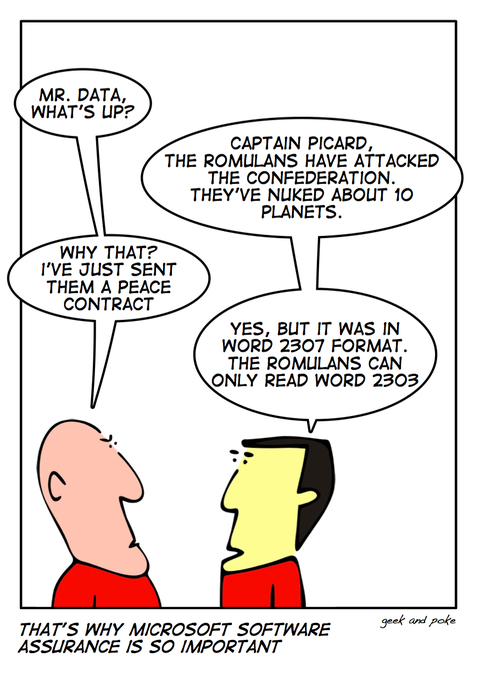
Let me get this straight: he switched back to Microsoft, AND is sticking to Office 2003 formats – but that’s the format he just stated OpenOffice handled perfectly!  No need to change then.  But the formatting problems are not only between OpenOffice and MS Office – they exist between different releases of Microsoft’s product, too, as I experienced earlier, trying to review a startup  CEO friend’s VC presentation. The process involved multiple conversions back and forth between different releases of the same Microsoft product, PowerPoint:

I reviewed and commented on it, and as an aside noted that the fonts and the text alignment were way off on a page.  He did not see the text problem on the version I sent back.  Then came a second round of conversions and emails.  It became apparent that no matter what we do we always end up seeing different layouts – so much for the MS to MS conversion – so we just focused on content, and I sent back the revised version.  It took a while… hm, no wonder, the PPT deck that started it’s life as a 2MB file first became 5, then 7, finally 9 Megabytes.  Wow!

Me and my friend were doing it all wrong, and apparently so did Dan: emailing multiple bloated copies of the same file, never seeing the identical version, when we could have started with an online presentation, collaboratively work on the one and only copy online, see the same and not clutter several computers with the garbage files.  Collaboration is just simpler online.

And let’s not forget the storage footprint issue. On my count, just between my friend and myself, we generated and stored nine copies of this presentation, the last one being 9MB, up from 2.  It’s probably fair to assume a similar rate of multiplication in the process the original deck was created, between the CEO and his team.  Next he sends it to the VC, who will likely share it with several Associates in the firm, and in case there’s more interest, with other partners.  Of course my friend will send the same presentation to a few other VC firms as well, so it’s not beyond reasonable to think that there are at least a hundred copies floating around, occupying a Gigabyte of storage or more.  Oh, and I did not even consider the footprint of this presentation at ISP’s and all hops it goes through.  Not that I ever bought into IDC’s Storage Paradox, but this is clearly a very wasteful process.

All of that could be replaced with one central copy on the Web, represented by a URL.  That’s the real solution, not switching Office packages.

(Cross-posted @ CloudAve )

post

Publish Your Blog / Site in 51 Languages

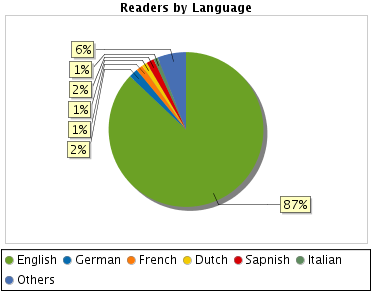
My readers are predominantly English speakers, as evidenced by this distribution chart:

Readers by Language - http://sheet.zoho.com

I suspect the 87% English-speaking majority may be exaggerated.  It’s based on the browser’s default language setting, which many don’t bother changing.

Anyway, for the sake of the min. 13%, but who knows, perhaps 20, 25% (?) I’ve installed Google’s Translator.  You can do it too.smile_wink Readers then can select a language from the widget,  but the real use case is for visitors whose default browser language is non-English: they will get a bar at the top asking if they would like all content served up in their language.

Machine translation still has rough edges, but it has come a long way, and is generally good enough to give readers an idea of what an article is all about – just forget grammar and style:-)

Here’s an example of this post in a few languages:

arito pumunta kami ulit: Ed Bott points out kung paano marahas ito ay para sa Apple na i-install ang tinatawag na “update” sa iPhone Configuration Utility sa isang Windows computer na hindi magkaroon ng software na ito na naka-install, sa katunayan isa na ay hindi kailanman nagkaroon ng iPhone o iPod konektado sa.

在這裡 , 我們又來了: 埃德博特指出 , 如何荒謬的是 , 蘋果電腦將安裝所謂的“更新”的iPhone配置實用程序在Windows計算機上沒有安裝此軟件,其實一個從未有過的iPhone或iPod connected to.

Ở đây, chúng tôi đi một lần nữa: Ed Bott chỉ ra như thế nào thái nó là Apple để cài đặt cái gọi là “cập nhật” vào Configuration Utility iPhone trên một máy tính Windows mà không có phần mềm này được cài đặt, trong thực tế, một trong đó có không bao giờ có một iPhone hoặc iPod kết nối đến.

(I’m sure it’s right, whatever it says. smile_shades)

Update:  Here’s something I missed, but Sandy Kemsley didn’t:

If you read this, or other Google Translate-enabled blogs in Google Reader, you can set it to auto-translate there.  Neat.

Related posts: