post

The Rush to the Z-list

(Updated)

Seth Godin set up a Z-list of marketing-related blogs with the idea of sending some traffic their way.  It did not quite work the way he expected:

Several bloggers worked hard to game the list I posted, instructing folks to vote other (worthy) blogs down. That’s sad.”

What a surprise.

smile_sarcastic  It somewhat reminds me of the fight that often goes on on reddit, where gangs of users downmod new posts only to keep theirs on top. (Hey, it’s only fair to pick on reddit, now that their owner, Wired picked on digg

smile_angry )   Another recent example is the 43 Best Blogs wiki, a social experiment that became quite a fight: people kept on deleting others and adding themselves several months later…

Of course I am in a convenient position, being a  life-long  Z-lister

smile_teeth

Update (12/30):   Steve Rubel’s New Year Resolution is to highlight new voices. So.. is that the … R-list?

And now I commit the despicable act of sucking up, sucking down, laterally ..etc, by linking to others posting on the subject:

Tags: , , , , , , , , , , , , ,  

post

Yahoo Falling Behind – Literally

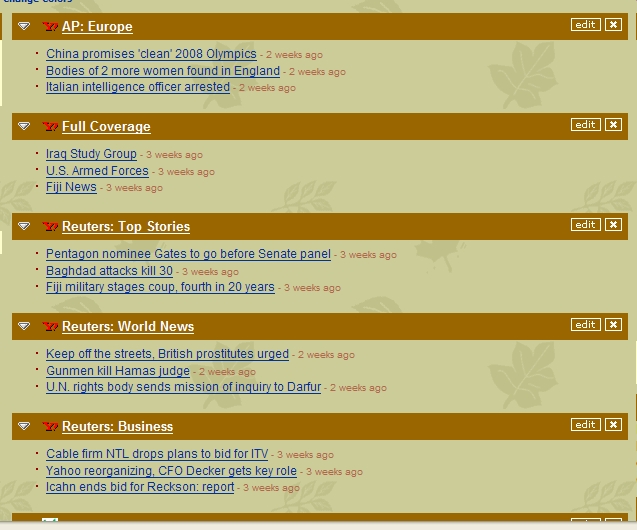
And I thought getting 3-4-day-old news was bad enough.  Naive me … today my.yahoo.com is serving up 3-week-old “news” from various sources:

According to  Yahoo the Fiji military coup just happened, Saddam probably has a few more weeks to live, and we won’t be ringing in 2007 for a few more weeks.

Or is this already the “2006 in retrospect” site? smile_baringteeth


post

RIAA Sues Russian Company for More then Entire Country’s GDP

A TechCrunch commenter pointed out that the amount the RIAA sued Russia-based AllofMP3, $1.65 trillion (!) is actually more than Russia’s GDP.    Isn’t that outrageous?


post

ProfileLinker – Just the Opposite of What I Need

ProfileLinker is a new service profiled on TechCrunch today:

“ProfileLinker wants to aggregate your social networking experience….You tell ProfileLinker your site credentials and it pulls your bio, friends and other information from those sites and centralizes it. You then use ProfileLinker to manage your activity on those networks: aggregate and manage multiple social profiles; discover new social networks and communities of interest within social networks; and receive notification of messages and friend requests from multiple networks.”

I am probably not the right target customer for ProfileLinker, I admit I don’t even have a MySpace of Facebook profile.  But I do have one on LinkedIn, and was invited to several networks whose function I’d find useful, except that I won’t take the time to create a profile from scratch again and again.  What I (and I suspect most networkers) badly need is a way to leverage the already existing profile and network (friends) information on other sites – probably by using a “central depository” of such information.

Who cares about ProfileLinker, give me ProfileCentral!


post

PayPal Virtual Card: Useful, Secure – Yes; Innovative – No

PayPal is inviting selected users to test their virtual debit card program.

“The virtual number is a MasterCard number used in place of your credit or debit card number. Each time you make a purchase from a website, a new number is generated. This avoids the problem of having the number stolen. Since it’s only good for one use, it doesn’t matter if someone steals it.

It certainly make sense, but I find it funny that it’s beeing heralded as new.  Like I’ve said before, “I only ever use throwaway, virtual credit card numbers on the Net, so scammers can bill all they want, they can’t charge my card” – that’s a service by CitiBank, and I’ve been enjoying it for at least five years. 

That said, it’s still a significant move, I’m sure PayPal will reach more tech-friendly users than Citi does.  So Markus Frind may be right:

If there is uptake on this it will really change online commerce.


post

Microsoft Handing Out Ferraris

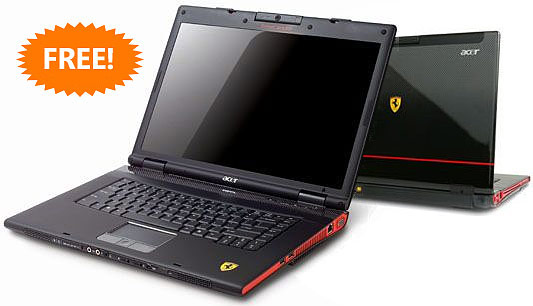
Microsoft is sending Acer Ferraris loaded with Vista to selected bloggers.

I’m trying to decode the hidden message here: I guess Microsoft would like us to think that with Vista we’ll get the performance of a Ferrari…

That’s not the first thought that comes to my mind though… try this: despite the underrated system requirements, you’ll need at least a Ferrari for VIsta to even chug along. smile_eyeroll


post

Happy Holidays

on second thought … MERRY CHRISTMAS!

post

Google Killing the Picasa Brand?

Despite being an Office 2.0-fan, there are a few client applications I just can’t live without, and one of them is Google’s photo management package, Picasa.  I know I am not alone … and I am still getting a lot of hits on some fairly old posts on the subject:

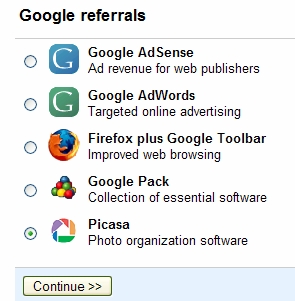
Yet it wasn’t until I read GoogleOS II: Starring Linus Torvalds on Read/WriteWeb today that I realized I should display the Picasa banner if I like it so much.  So let’s give it a try:

Selecting Picasa takes me to the next step, where I can choose from a number of  text links like:

or badges like:


Yes you’re seeing it right: there is no Picasa ad whatsoever – only Google photo software. The landing page these links take you to appears to be in transition: it starts with “Use Google’s photo organizer to find, edit and share the pictures on your computer” , then the word Picasa is mentioned twice, but not in a prominent position. I guess Google is preparing to slowly phase out the Picasa brand… just like Writely died to give birth to Google Docs (and Spreadsheets). Hey, they could have named the other app Calcly

smile_wink

This makes me wonder what happens to other good brands in Google’s hands: do we get to lay with GSpot after all? Or will it just be assimilated, to be part of Google Docs and Spreadsheets and Wikis? By the time Google acquires a decent presentation app, it could be Google Docs,  Spreadsheets, Presentation and Wikis – that’s almost as good as some of Microsoft’s naming wisdom

smile_omg

Oh, and coming back to the excellent Read/WriteWeb article, I can’t wait to get my hands on some Ginux.

martini


post

It’s the Silicon Valley, After All

Software all not, events like this reassure us that we ‘re still in the Silicon Valley smile_angry

post

Zoho Adds Wiki to Online Suite – It’s All Coming Together

It’s nice to get your dream fulfilled fast.  Writing about Socialtext 2.0 in October I wrote:  “My ‘dream setup‘ for corporate collaboration: a wiki with an integrated Office 2.0 Suite.”
A little later in my post on the JotSpot/Google deal I specifically called for my friends at Zoho (I’m an advisor to the company)  “to make their move soon: they either need to come up with their own wiki, or team up with a wiki company…So far Zoho is ahead of Google in Office 2.0, if they want to maintain that leadership, they will need a wiki one way or another.”

I did not have to wait long, Zoho Wiki is here, announced simultaneously on TechCrunch and the Zoho Blog

This product is perhaps the first showcase of how Zoho’s long term product strategy will play out.  To begin with, if you are a registered user for some of Zoho’s other products, your single sign-on automatically gives you access to the Wiki.  (For now you can create 3 wikis, but I don’t expect this restriction to last long.)

While most wikis I know of started their life without  WYSIWYG editing – yes, you had to write ugly markup language – Zoho Wiki shares the codebase of Zoho Writer, so right at the start you have all the bells and whistles of the popular editor, including formatting options, special characters, emoticons, inserting tables and a spell checker, amongst others.  As for appearance, there are 5 themes to select from, should you not like the default one.

A wiki is all about linking: Zoho supports multiple options of creating new pages and linking to them:

  1. there is a large “create new page” button displayed consistently on all pages
  2. you can use the link icon from the editor and pick wiki pages, email addresses or external URLs.
  3. you can just type a WikiWord (also known as CamelCase) to create a page and link to it. (LinkAsYouThink)

#1 above is normally followed by creating links to the new page, but my personal preference is either #2 or #3, both of which create a “shell”, i.e. a link to a not-yet-existing page, that you can click on to actually create/edit the new page – this is way you can be sure you won’t end up with orphan pages. (I wrote more extensively about the orphan problem here)

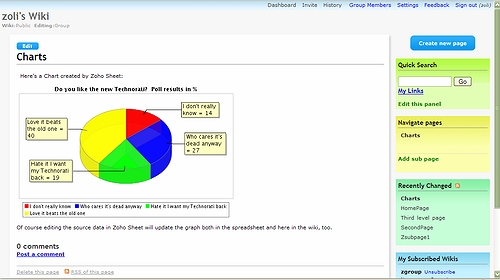
Perhaps the most distinctive feature is how you can embed objects from other Zoho and 3rd-party applications: spreadsheets, graphs, presentations, forms, videos, slideshows…etc.  The screen-shot below comes from my test wiki, where I used a chart originally plotted in Zoho Sheet, using data coming from Zoho Polls, and originally published on my blog.

Pre-Google JotSpot became known as the “application wiki” for including a few pre-defined forms; think of the possibilities when you can use the full power of Zoho Creator to create forms/applications and embed them in your wiki.   Of course whichever application the data is updated in, it will be reflected in all other apps, typical Zoho-style.

For non-Zoho apps, see these two examples: a Youtube video and a Bubbleshare slideshow embedded in a Zoho wiki.

As for permissioning, both read and edit access can be independently set to either private / everyone or group; group members then can be managed individually.  What I would like to see in the future is the ability to centrally manage “groups” across all Zoho apps: for example set up a group in Virtual Office, where all my contacts are, then just refer to the group by name to share spreadsheets, wikis, presentations..etc.

And talk about wishlist, since I was recently fairly critical about SocialText 2.0, I have to be fair and state that I am missing some of the same features here, too: inbound links (backlinks), breadcrumbs to ease navigation, nested comments, improved history, and the ability to email to wiki pages.  The Zoho team reassured me that these are planned for future updates.

Notably absent is attachment handling and versioning, a standard feature in better business wikis, yet I don’t consider it an omission, rather good strategy. Why?  Document management/versioning in wikis solves a critical problem, but does so on the basis on yesterday’s (OK, today’s ) technology.  Even with proper versioning one has to download documents, locally update them, then upload them back up to the wiki. 

That’s a lot of work, and Zoho has a an easier, more streamlined  approach to do it all online. Not only they integrate Writer, Sheet and Show to the wiki, but have also provided tools to easily access documents originated by Word, Excel, Powerpoint online.

The current integration is still somewhat clumsy (but working): you invoke the applications separately, save your work, and either link to the document’s URL from within the wiki, or embed it by using the “insert html” icon.   What I’d like to see eventually:

  • Easy access to invoke to editor / sheet /show ..etc applications from inside a wiki page – perhaps a colored area on the sidebar
  • Smart linking: link button would bring up list of not just wiki pages but all my Sheet, Writer ..etc files
  • Single button embedding without having to copy/paste html code
  • Last but not least, text search not only of wiki pages but all my data across all Zoho applications.

Considering Zoho’s breakneck speed of product releases, I am quite optimistic that we don’t have to wait long.  It’s all coming together – in 2007.

smile_regular


Related posts: