post

Zoho Announces Multimedia Notebook at DEMO

(Updated)

The Zoho folks will be announcing yet another product at DEMO – this time it’s a multimedia NoteBook. Since whenever they release a product, the Microsoft / Office analogy is quite unavoidable, let’s just get it out of the way: this is Zoho’s “OneNote” – and a lot more. (Bias alert: I am an Advisor to Zoho).

Notebook is an online application to create, aggregate, share, collaborate on just about any type of content easily – all in one place, without having to switch applications. You can create multiple books and within that multiple pages. There are a number of page-types to begin with, including Sheet, Writer, Calendar, Contacts, Planner, Task – these correspond to Zoho applications – or simply start with a blank page.
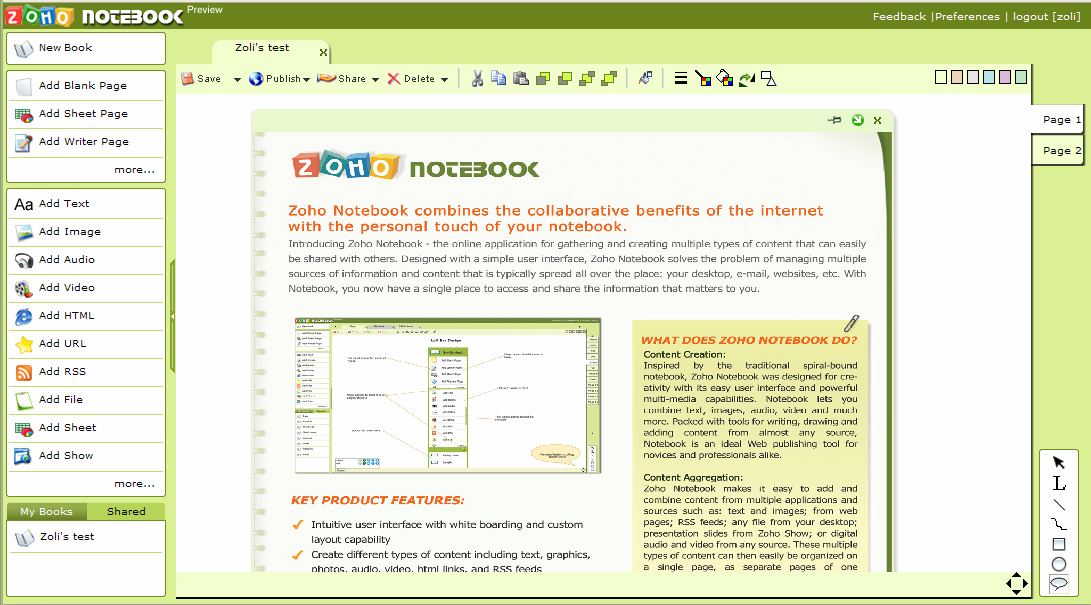
You can easily create any type of content within a page: text, image, drawings, audio, video – these could be embedded youtube videos or record from your own camera / microphone directly into Notebook. Place your content anywhere in the page by freely dragging it around, resizing, reshaping it. Aggregate content from multiple sources: embed Show, Sheet data, web pages, RSS feeds, file attachments. IE and FireFox plugins allow easy clipping of web-content.

If it’s Zoho, it has to be collaborative; but this time NoteBook brings real-time online collaboration to a new level: you can share book-level, page-level or individual object-level information. This means you can selectively collaborate with certain users on your text, while sharing the chart with yet another group, and hiding the rest. Updates to any of these objects are reflected in the NoteBook real-time. Integration with Skype allows Skype presence indicators in the individual shared object as well as direct IM-ing over Skype. Needless to say, version-control is taken care of at the object-level, too.

Now, for the bad part: NoteBook is currently in limited Alpha mode … so hang on for a while ..

fingerscrossed and in the meantime, enjoy this demo video:

NoteBook is unquestionably the sleekest of all Zoho apps, and a technological marvel. There are clearly specific target demographics, like students, where an All-In-One notetaker is the killer app. In a more typical business environment one might wonder where it fits in the range of products available, and what application to use when. Update (1/31): Dennis lists much better use-cases:

“I can see huge potential for this among those professionals who need to assemble audit and M&A resources for example. It makes the creation of a multi-disciplinary team very easy with the ongoing ability to collaborate as projects evolve while remaining in an organised, controllable environment.

I can see other use cases arising in forensic work, planning, budget management, time and expense management – the list goes on. In this sense, Zoho Notebook could become the de facto desktop for knowledge workers because you don’t need to leave the service to do pretty much all the tasks you’d expect a knowledge worker to undertake. I can also envisage some interesting mashups using accounting data from a saas player that gets pulled into Notebook on and ad hoc basis. Does this mean Notebook is a ’silver bullet’ application.

I’m going to stick my neck out and say a qualified ‘yes.”

About a month ago, while reviewing then new Zoho Wiki I expressed my hope to see tighter integration to the Zoho Suite – specifically Writer, Sheet and Show. Well, now it’s here, albeit in a separate application. Ideally I’d like to see the wiki equipped with Notebook’s powerful editing /collaboration options – or is it the other way around? If you take NoteBook, and allow linking between pages/books … well, that’s quite close to a wiki.

smile_wink. Update (1/31): In the same post I’ve just referred to, Dennis says: “Zoli Erdos has an interesting take on whether the collaboration features put Notebook in the same class as a wiki.”

Let me clarify my point: I’m not comparing NoteBook to Wiki as it stands now. What I do believe is that the feature sets of the two should be merged somehow. Combine the “digital dumping ground” as Dennis says, i.e. the absolute flexibility of creating/aggregating any type of info with the linking, back-linking, navigation, search in the wiki, and you have a truly killer business app.

Zoho has a tradition of initially developing products individually, but share the code-base early, and integrate them later. What do you think? Should Wiki and NoteBook be merged to create the super-product, or is there a need/ market for them to be independent in the long run?

Update (1/30): See related posts on TechCrunch, Read/Write Web , Zoho Blog , Scobleizer, /Message, CMS Wire, InformationWeek, PC World.

Update (2/1) : Robert Scoble’s summary: ““cool” has different meanings: 1) That it’ll change how you work. Zoho’s Notebook wins here.

Update (2/2): The video of Zoho Notebook’s launch at DEMO is now up here.

Tags: , , , , , , , , , , ,

post

Koral – Collaborative Content Management without the Hassle of "Management"

My regular readers know I’m a big fan of wikis. There is just no better way for collaborative group work. If I started a company today, we’d have a wiki from Day 1. Gartner predicts 50% penetration to business by the end of 2009 – that’s Gartner, that’s only 50% and that’s 3 years away. That leaves a large number of businesses unserved, and a huge opportunity to enable them to collaborate without changing the way they work.

Today the #1 productivity platform in business is still Microsoft Office. A typical “knowledge worker” creates documents, spreadsheets, presentations on her/his desktop, tries to maintain order by diligently filing them under an ever-growing directory-structure and shares the information by emailing the files around. When several co-workers need to contribute to a document, version chaos ensues. Document management systems are supposed to ease the pain, but they are big, expensive, and surprisingly (?) only 5% of office workers actually use them.

Koral, a content collaboration startup debuted a few months ago has a strong change to change it all. It pursues a very simple idea: allow users to share information, give them access to the most recent version of all documents, whether the latest update is on their desktop or someone elses, and guide them with several popularity/ usage indicators, i.e. most accessed documents, most active contributors, best rated experts ..etc – do it all without forcing users to change how they work today.

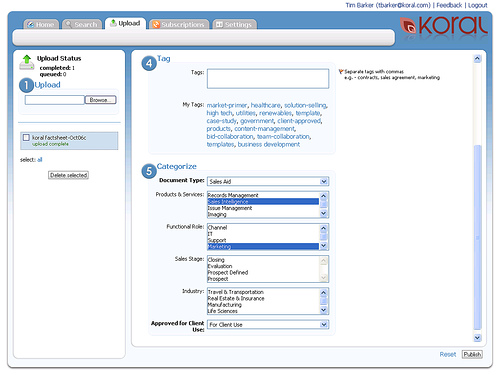
They can continue individually working on their desktops, and all they have to do is drag the documents to be stored into Koral’s drop-box on their desktop. The document is instantly uploaded, fully indexed, auto-tagged based on content, and for certain document types (for now PPT) flash previews are generated. The user does not have to be logged on to the web-based system, although doing so allows for additional categorization, tagging, permissioning:

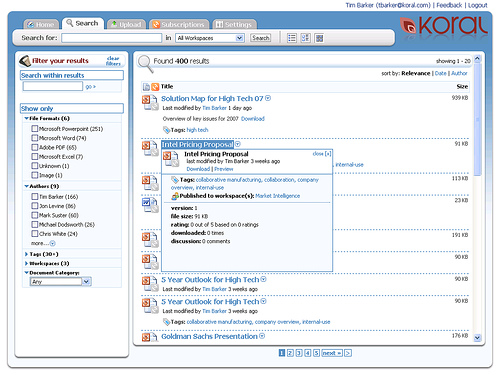
All this information becomes the foundation of easy document retrieval. Gone is the directory jungle where files are replicated and lost: it’s all about tagging and powerful search. Search, which can based on simple keywords, boolean expressions, or multi-step, clustered search where a friendly interface helps the user create further filters based on content, file formats, tags, categories, author ..etc until the number of matching documents comes down to a handful – at which point the online previews come handy.

Once you found what you’re looking for, you can download your document, or subscribe to it, giving you alerts any time the document is updated. The subscription mechanism goes beyond just notification: it’s the foundation of document synchronization. Koral places a tracker the local (desktop) document, so it will know who has what version at any time. When you access a local document – open it, or even attach it to an email – Koral will warn you if you don’t have the most recent version (i.e. someone else has updated it online) and of course offers to replace your old copy.

Sync goes a step further: how often do a few “core slides” get replicated in dozens of corporate presentations? Or a key spreadsheet embedded in various other documents and slides? Koral can refresh all these second-generation documents when the core slide/spreadsheet changes – i.e. your numbers are magically updated.

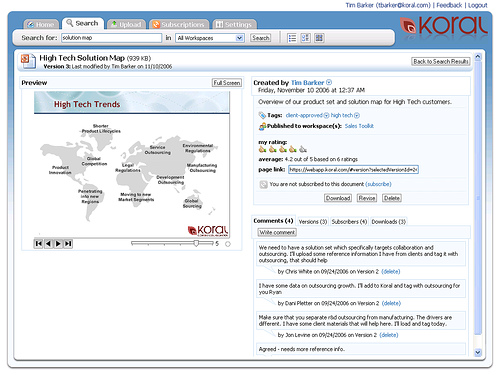
Stepping beyond traditional document management there are a number of social networking / bookmarking features: documents can be rated, commented on.

The document summary page above shows the average rating, number of users who rated the document, number of downloads and subscribers, and comments, on top of the standard document attributes like creation date, author, version number.

Koral is currently piloting a version with select customers where they can provide ranking statistics based on some of the above information: most frequently read, downloaded, subscribed document, most discussed document, most popular post or author, most popular tags ..etc. Needless to say you can subscribe to authors, tags, categories, not just individual documents. All this essentially supports better information discovery rather than just explicit search for information you already know exists.

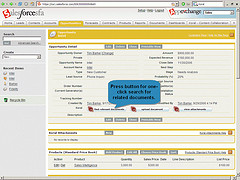
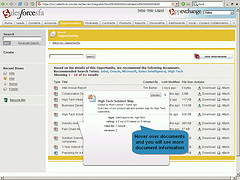
Finally, some of the best applications are when you don’t even notice you’re working with Koral: users of Salesforce.com can discover related documents and attach them to the lead / opportunity record without ever leaving the salesforce.com environment.

Talk about mashups …Koral itself is a “bridge” product, enhancing the productivity of largely offline users (working in MS Office) by offering an online service. I would love to see them move further on the offline/online continuum by offering online tools to not only preview but actually edit documents online – the recent Zoho-Omnidrive mashup is a good precedent to follow.

For additional information, check out the demo video by Tim Barker, VP Products, and Robert Scoble’s interview with CEO Mark Suster.

Tags: , , , , , , , , , , , , ,

post

More Poison for You – Buzz Donuts

As if donuts were not unhealthy enough (they are basically a big fat sugar-bomb), they might soon be laced with caffeine.  (hat tip: Christine Herron)

A scientist found the way to mask the normal bitterness of caffeine so that it can be used in food and pastry products such as bagels and donuts.  He’s in talks with Krispy Kreme, Starbucks and Dunkin’ Donuts… watch out for Double Poison.

I just wonder if someone will be crazy enough to come up with “decaf buzz donuts”. smile_sick


post

SAP’s Zesty A1S(auce)

SAP held major internal announcements and demos of its A1S product, tailored for the mid-market, the future growth sector now that the top end of the ERP market is saturated.

The demos were top-secret, attendees had to sign an NDA – and since I am not one of them, I’m left wondering whether they’ve seen the original flavor or the Zesty one Evil Banana

post

Hooters VIPs: Bill Gates, Warren Buffet

Hooter’s hasn’t had a buffet so far.. now it does… a rather rich one, for that matter.smile_wink  Warren Buffet and Bill Gates were presented a Hooters VIP Card, which entitles them to free food at any of the chains 435 locations in 46 states and 20 countries.  Tip not included – I wonder if these guys carry around cash for tipping?

I don’t know about BillG, but Warren Buffet is a man of traditional values… smile_tongue

(hat tip: Digital Inspiration)


post

Not Your Average 12-year-old

Would you believe the man on this photo is 12 years old?  I certainly wouldn’t.  How he fooled a town, school teachers, principals into believing him is beyond me.  But that’s exactly what Neil Havens Rodreick II did.

The 29-year old “convicted sex offender attended at least two Arizona middle schools, sat through seventh-grade courses and turned in homework as he moved around the state pretending to be 12 years old, officials say.”

OK, so maybe it’s just me … I don’t see him “baby-faced” like school staff did.  But wait, it gets better weirder.

He lived with two man, ages 43 and 61, who regularly had sex with him, thinking he really was 12.  Now, hm … without getting into the very details, how can you not tell a man from a child while having sex with him?  

Surprised?  So are the two men who felt very “upset” that their live-in sex partner turned out to be an adult.  Now they are facing charges of attempted child molestation and attempted sexual contact with a minor – since they really thought Rodreick was a minor.

Lots of surprises in this town.  Perhaps not so surprisingly – after all, it’s in Surprise, Arizona.

Full story and  video on CNN.  


post

Google Groups Out of Beta – Again

It’s not everyday that a Google product announcement goes largely unnoticed. That’s exactly what happened yesterday when Google announced a “new version” of Groups.

The reason for no fanfare is that it isn’t exactly a new version… well, there is a new version, just not now, but in October. Back then, when it was really new, I enthusiastically welcomed the change:

“Wrapping it up, in a major step forward, Google Groups which so far has been just a group email mechanism, becomes a mini community/collaborative platform, likely attracting previously “email-only” users to the native web-interface – and we all know why Google loves that. “

Google Groups may very well be the only (?) product that entered Beta stage twice – back in October, when all the goodies were added, Google re-labeled their upgraded product as “Beta”. Today, with this new announcement I’m not finding any new-new features. I suspect all that happened was Groups grew up again, and left the Beta stage. Funny that the word “beta” is not once mentioned the announcement, but comparing the logos, that’s the only conclusion I can draw.

Tags: , , , , , , , , , ,

post

Sutter Health Committed a PR Suicide – Firing Military Hero Nurse

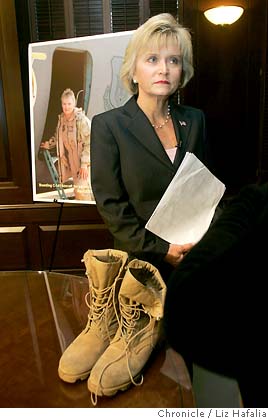
Lieutenant Colonel Debra Muhl of the U.S. Air Force Reserve got fired from her job at Sutter Health two days after she told her supervisor she was being deployed to Iraq.  Now she filed a lawsuit.

Colonel Muhl is an honest-to-goodness war hero,” her attorney said. “She has treated thousands of wounded individuals and service members …”

Sutter Health insists that Muhl’s termination was based on internal economics only.

While I’m not qualified to comment on the legal merits of the case, I do recognize a major blunder when I see one.  Whether the firing was lawful or not, the PR nightmare of firing a military hero (and wherever we are on the Iraq war issue, we have to recognize her as such, not being in an active combat position but saving lives) .. anyway, repairing the PR damage from firing a war hero will far outweigh the savings from whatever “internal economics” Sutter Health referred to.

Sutter Health could not have made a more stupid decision.

(full story at the San Francisco Chronicle)


post

KeepYouSafe Launches – But What’s the Difference?

 The startup du jour is KeepYouSafe, a “secure storage network for your vital personal information like medical records, drivers license copies, passports, wills, credit card copies, financial records, insurance papers, basically everything in your wallet and personal filing folders that you deem important.”  (hat tip: Web Worker Daily)

The Founders blogged their mantra the day before Launch:

“Don’t guess what people want

After 9/11 and even more after Katrina we heard from people that they wanted a secure, convenient place important “stuff”…

…We did some market research and found out that people really did want a trusted place online to keep important “stuff”. Not a backup of their whole computer, just those super critical records and files that they could not live without.”

OK, I get it, this is what people want, after all, they said so smile_wink   That said, how many different online safety deposit boxes do we need?  More importantly, how many overlapping services do we want to pay for?

Once you scan in your passport, birth certificate …etc – they are just files, nothing more, nothing less.  Just like your work documents, music, photography.   I’ve previously wondered why ProtectMyPhotos wouldn’t protect ALL my files – after all, it already does photos and office documents – and the same applies here.

 At $36 a year (for unspecified capacity) KeepYouSafe is not that far from the likes of ProtectMyPhotos and Mozy.  In fact considering the much less anticipated traffic (how often does your passport change?) it’s relatively expensive.  I wouldn’t be surprised if a year from now all of these services would be alike: complete file protection services.

Update (1/23): Mike Murray noticed a few things that completely escaped my attention:

Nowhere on the site is there any identifying information.  This could be an innocent oversight, but it’s big; if you want me to trust you with my data, at least I should know who you are. (I gave the same advice to the otherwise excellent Brainkeeper team the other day).

Their terms of use abdicate all responsibility:

KEEPYOUSAFE.COM AND ITS SUBSIDIARIES, AFFILIATES, OFFICERS, EMPLOYEES, AGENTS, INVESTORS, MEMBERS, PARTNERS AND LICENSORS MAKE NO WARRANTY … (vi) THAT THE DATA AND FILES YOU STORE IN YOUR ACCOUNT WILL NOT BE LOST OR DAMAGED OR EXPOSED.

Mike sums it up:

Please scan and send me all of your important data… I’ll protect them, I promise. (But my terms of service say that I don’t have to.)

smile_sad


post

Group Collaboration is NOT Dead

(Updated)
It’s become fashionable to beat up large corporations. I understand the feeling; having done my time in the corporate world I know I’m not going back … but that said, not everyone is a freelancer, startup entrepreneur or just “old-fashioned” small business employee. Most of today’s workforce are still corporate employees, and large companies produce most of our GDP, like it or not.

Which is why I don’t understand Stowe Boyd’s rant against group-oriented collaboration tools:

“The basic model of 90’s era collaboration, a la Lotus Notes, is all about the group. Information was managed in group-based repositories, then passed around for review, or published to intranet portals via customized apps. Information era workflows where people are first and foremost occupiers of roles, not individuals, and the materials being created are more closely aligned with groups than individuals.

Web 2.0 social tools — largely — work around a different model. Social networks — explicit ones like MySpace and Facebook, or implicit ones in social media — are really organized around individuals and their networked self-expression. I am writing this blog post, and publishing it, personally. It is not the product of some workgroup. It is not an anonymous chunk of text on a corporate portal. My Facebook profile pulls traffic from my network of contacts, sources I find interesting, and the chance presence updates of my friends.

I don’t need to participate in groups to exist or to share — or to matter — in this world.

On the other hand, Notes and Sharepoint, and even their webby second cousins, like Basecamp, are principally organized around groups. I have argued in the past about the work federation design flaw in Basecamp (see here: Basecamp and The Federation Of Work), but the basic problem is the wrong emphasis on belonging to groups instead of being connected to individuals.

Well, Stowe may not need to participate in a group, being a successful freelancer, but the average corporate employee does, and they are IBM’s target market. Group-thinking, collaboration is as important as ever, not only to enable individuals co-create better, but also, as a secondary effect to preserve knowledge – should the individual leave, business does not come to screeching halt.

Quickr or Slowr, Lotus Connections and Sharepoint will make a killing this year. Personally, I’m quite happy I don’t have to touch them – but then again, like Stowe, I’m not a corporate employee. I just don’t forget about the majority of the world, who are.smile_wink

Update (1/23): Stowe’s post stirred up a bit of conversation:

Tags: , , , , , , , ,