MS Money: Old Financial Data May Not Be Accessible on Vista

Personal Productivity, Software June 30th, 2008

You’d think at least Microsoft’s own products are compatible with Vista.  Well, sort of.  MS Money users who converted from Quicken may be out of luck.
I have a lot of financial data in Microsoft Money and prior to that in Quicken files. Both  applications used to recommend you keep the data files small by archiving earlier years. With today’s faster computers archiving is no longer an issue, but if you’re  a long-time user like I am, you probably have a few old archive files.

Every time you “upgrade” Money (hardly any new value, but if you use online services, MS forces you to upgrade every 2-3 years) your current data file is upgraded to the new formats, too. But what happens to the archive files?

I decided to convert all my older Quicken files to Money, just in case… after all, Money supports Quicken conversion.  Or not: crash.  Crash again.. and again.  I tried several data files, even rebooted the system, to no avail: Money consistently crashed at all conversion attempts.

This is where Vista’s Problem Reports and Solutions comes handy, and yes, a few days later it shows “solution found”. Hm… if they found it, they certainly are not sharing it.  Here’s the user-friendly stuff I found:

<?xml version=”1.0″ encoding=”UTF-16″?>
<DATABASE>
<EXE NAME=”MSMoney.EXE” FILTER=”GRABMI_FILTER_PRIVACY”>
<MATCHING_FILE NAME=”adapt.dll” SIZE=”109360″ CHECKSUM=”0×24BD92C0″ BIN_FILE_VERSION=”16.0.0.1303″ BIN_PRODUCT_VERSION=”16.0.0.1303″ PRODUCT_VERSION=”16.00.1303″ FILE_DESCRIPTION=”MSN Money Adaptation DLL” COMPANY_NAME=”Microsoft(R) Corporation” PRODUCT_NAME=”Microsoft(R) Money” FILE_VERSION=”16.00.1303″ ORIGINAL_FILENAME=”adapt.dll” INTERNAL_NAME=”adaptation” LEGAL_COPYRIGHT=”Copyright © Microsoft Corp. ” VERDATEHI=”0×0″ VERDATELO=”0×0″ VERFILEOS=”0×4″ VERFILETYPE=”0×2″ MODULE_TYPE=”WIN32″ PE_CHECKSUM=”0×25BFE” LINKER_VERSION=”0×60000″ UPTO_BIN_FILE_VERSION=”16.0.0.1303″ UPTO_BIN_PRODUCT_VERSION=”16.0.0.1303″ LINK_DATE=”01/04/2007 07:49:53″ UPTO_LINK_DATE=”01/04/2007 07:49:53″ EXPORT_NAME=”Adapt.DLL” VER_LANGUAGE=”English (United States) [0x409]” />
<MATCHING_FILE NAME=”adaptres.dll” SIZE=”13104″ CHECKSUM=”0xA99DDA54″ BIN_FILE_VERSION=”16.0.0.1303″ BIN_PRODUCT_VERSION=”16.0.0.1303″ PRODUCT_VERSION=”16.00.1303″ FILE_DESCRIPTION=”MSN Money Adaptation DLL” COMPANY_NAME=”Microsoft(R) Corporation” PRODUCT_NAME=”Microsoft(R) Money” FILE_VERSION=”16.00.1303″ ORIGINAL_FILENAME=”adapt.dll” INTERNAL_NAME=”adaptation” LEGAL_COPYRIGHT=”Copyright © Microsoft Corp. ” VERDATEHI=”0×0″ VERDATELO=”0×0″ VERFILEOS=”0×4″ VERFILETYPE=”0×2″ MODULE_TYPE=”WIN32″ PE_CHECKSUM=”0×4855″ LINKER_VERSION=”0×60000″ UPTO_BIN_FILE_VERSION=”16.0.0.1303″ UPTO_BIN_PRODUCT_VERSION=”16.0.0.1303″ LINK_DATE=”01/04/2007 07:00:04″ UPTO_LINK_DATE=”01/04/2007 07:00:04″ VER_LANGUAGE=”English (United States) [0x409]” />

This looks like the problem report sent to Microsoft, not the solution.  There’s one hint though: the filename is AppCompat.txt.  Perhaps it’s a Vista compatibility issue?   Luckily I still have an XP laptop around, the data files are there thanks to Foldershare sync (more on synchronization in the next post), all I have to do is install MS Money on the XP machine and try conversion there.

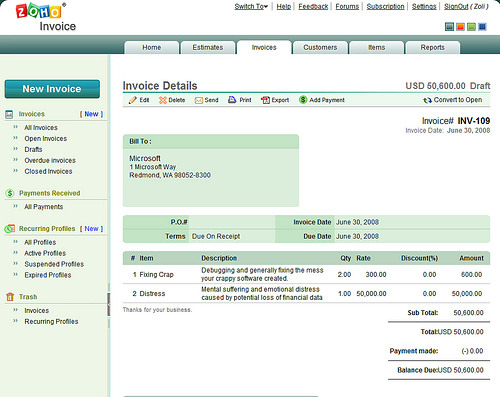
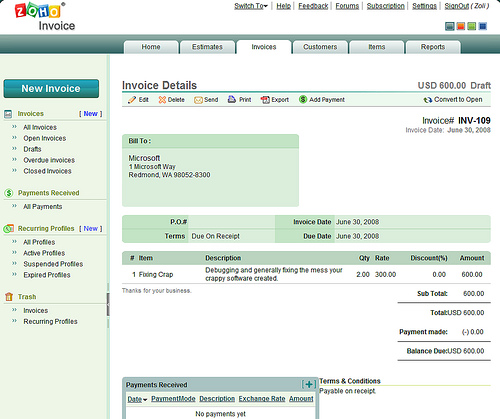
Voila!  Half an hour later I have the Quicken files converted to Money on the XP computer.  Money’s import/conversion routine is incompatible with Vista!   The whole exercise, including search on the Money Group took me about 2 hours, so dear Microsoft, here’s my invoice for lost productivity:

Oh, wait, we’re in the US, perhaps I should have presented a properly Americanized version. smile_wink

My poor experience was with MS Money 2007, but with Money Plus, the 2008 version of the product line Microsoft shows true ignorance to users’ legacy data needs.  Money Plus comes in four editions: Essentials, Deluxe, Premium, and Home & Business.
Microsoft offers a nice comparison chart, which neglects to mention a small detail, available only at the footnotes:

* Important note – Microsoft Money Essentials will not be able to open previous Money or Quicken files. If you are upgrading from a previous version of Money or Quicken, Money Plus Deluxe may be the right solution for you.

Not opening Quicken … well, it’s their decision. But not opening data from their very own previous releases? And this is hidden in the small print?

I rest my case.

Zemanta Pixie

Tags: , , , , , , , , , , , , , , , ,

Amazon Pulls a Digital River + FaceBook

Business, Software January 6th, 2008

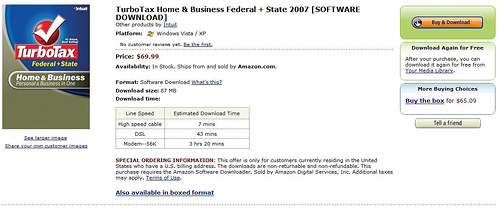
Tax-time is soon upon us, and for millions of Americans that means buying TurboTax again.  Fastest way to get it? Download from Intuit. Cheapest way to get it?  Buy at Costco. 

Not anymore. This year the fastest AND cheapest way is to download it from Amazon. Yes, Amazon entered the software download business, although initially the only available products are the different TurboTax flavors.


The traditional, box-sale page points to the download version, claiming you will “save time and money by downloading” software.  Well, not quite. The downloadable version of each product is priced to match the boxed product+shipping charges. This is a missed opportunity, there are obvious savings from not having to manufacture, ship and store a tangible product, so they could afford to create financial incentives to move more customers to the download option.  (Note: “they” means both Amazon and TurboTax maker Intuit, which also offers the box and download at identical prices.)

There’s one thing I really, really don’t like about this new Amazon service:  before you can purchase anything, you need to download and install the “Amazon Downloader”, which in turn will download and install the actual product. Now,  I don’t know about you, but I certainly am not buying software frequently enough to justify the need for a client, whatever benefits(?) this approach may offer. And of course once you install software, you know you’re in for a lifetime of endless updates…smile_baringteeth

If you ever need to download your purchased software again, it’s available under a new section called “Your Media Library.”  As Mashable’s Adam Hirsch discovered, this is a lot more than just a listing of your digital purchases: you can list all purchases from Amazon and other sources, adding your items by simply scanning their barcode through your webcam, Amazon will convert and import the information automatically . There are a number of ways to share all this with friends, start discussions, tag items, subscribe to your friends’ collections via RSS, and follow what’s hot at any time.

If you think this is all similar to FaceBook’s Beacon, that’s because it is. With a significant difference: Amazon’s version is entirely opt-in. 


Related posts: Download Squad, Mashable, Windows Connected, Web Worker Daily.

Tags: , , , , , , , ,

Intuit’s Update Fiasco: There is a Better Way

Personal Productivity, SMB / SME, SaaS December 17th, 2007

Intuit appears to have entered a new market, that of permanent file deletion. Whether you want it or notsmile_angry:

“Mac users who installed an update to their QuickBooks software over the weekend were met with a nasty surprise: missing data.

The update caused several Mac users to lose data from their Desktop folders, infuriating many who were hoping to close their books this week for 2007, only to lose valuable purchase orders and spreadsheets” - reports News.com.

Intuit’s recommendation:

“For those of you who have been affected, we are testing out options for recovering the deleted files. Our recommendation for now is to turn off your computer and do not use it further. If you continue using your computer or reboot, you may over-write the area on the disk where the deleted data is stored, preventing any recovery efforts from being effective.”

Hm…considering the type/size of businesses typically using QuickBooks, not touching their computer in the middle of the year-end rush may not be a viable option.smile_sad. Intuit is clearly throwing in support resources, customers can register and will be called back to individually assess their situation. For many, the damage may very well be more than losing a few hours:

(This is where I wanted to quote an Intuit forum message claiming lost file, lost business damage - I saw the post 15 minutes ago, now it’s gone. Could it have been deleted?)

We’re living in the age of crappy software. QuickBooks is not alone, this incident is just more dramatic than the typical update failures. Even when updates don’t fail, they are becoming a nuisance. Last week I just pinged someone on Skype, when my Internet connection dropped again - a “standard” Vista feature, to be remedied by a reboot. So there I was, waiting to resume the chat session when the machine decided to implement 9 updates. This being a ’screamer’ PC the update only took 7 minutes before shut-off, and a few more to configure on re-start; by the time I could come back online, my chat partner was gone. The two XP laptops in the house are a lot slower, so I just left them alone to complete their 11 updates… experience tells me sometimes these take half an hour or more.clock Who has time for this? Between the applications we actually use and all the crapware needed just to keep our computers running (virus scan, firewall, anti-spy, desktop search, backup, synchronization …etc), it’s just getting way too much to deal with.

By now my regular readers probably know where I am heading: there is a better, safer, easier way. Proponents of Cloud computing (On-demand, SaaS) typically point out portability, collaboration as key benefits, but there’s another huge benefit: ease of mind. The web applications I often use (Gmail, the Zoho Productivity Suite, CRM..etc) get updated just as frequently (actually, more) than their desktop counterparts, but I don’t have to worry about these updates: the service provider takes care of them. The whole process is not transparent to me, the user. I dumped the responsibility on the service provider: they work for me. smile_wink

Are you ready to have peace of mind?

Update: I could not have made this up: just as I was about to post this, I checked TechMeme for updates to the Intuit story, only to see this headline: Microsoft security update cripples IE .

I rest my case.

Related posts: support.quickbooks.intuit.com, CNET News.com, The Apple Core, CrunchGear, MacUser, Macsimum News, Ubergizmo, Apple Gazette, O’Grady’s PowerPage, Zero Day , Donna’s SecurityFlash, AccMan Pro.

Tags: , , , , , , , , , , , , ,

Software 2006: Questioning the McKinsey Study

Business, ERP / CRM, Enterprise Software, SaaS, Software April 7th, 2006

(Updated)
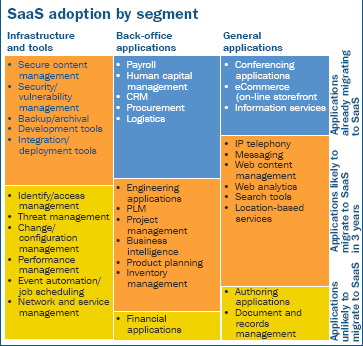
McKinsey and Company in collaboration with the Sand Hill Group, organizer of the Software 2006 Conference released their Industry Study (pdf) that I have to take issue with. (yes, I know, who am I to disagree with McKinsey?)

“Business Model Discontinuity: Software as a Service (SaaS) and Open Source. Two major business models are vying for an growing share of software spend: Software as a Service and Open Source. …SaaS has already gained traction in number of application areas – such as payroll, human capital management, CRM, conferencing, procurement, logistics, information services, and e-commerce) – and should make gains across a much broader cross-section of applications over the next 3 years. Out of 34 application areas we have examined, only nine are unlikely to see some SaaS adoption over through 2008”

Apparently McKinsey tells us that Financial Applications are the back-office function most unlikely to see SaaS adoption for years to come. Hm … I know the trendy app now is CRM, but there were widely-used web-based packages long before CRM. Intuit, NetSuite (originally NetLedger), Intacct, 24SevenOffice, WinWeb ..just to name a few.

Perhaps these companies can jump in here, and tell us what they think of McKinsey’s prediction that SaaS will not take off for financial apps?

Update (4/7): Dennis Howlett has a really good point bringing up Document Management, the other “unlikely” area per McKinsey. As to confidentiality concerns: the numbers in the financial apps are the result of real business activity that may very well have been in other hosted systems, e.g. CRM, Procurement..etc. Document Management? Oh, well, our external interaction is often on hosted platforms (email), sales contracts are largely in hosted systems (CRM)… I could go on.
Interestingly enough businesses lost more confidential data stored “safely” inside the firewall due to disgruntled ex-employees than due to “exposure” to SaaS providers.

But the point I made about Accounting systems, that this isn’t subject to predictions, it’s already happening, or has happened largely: accounting was available On-Demand before CRM was “born”.

Update (5/31): New McKinsey paper bullish about SaaS model. (hat tip: Nick Carr. Free registration required to read).

Update (8/17): Dennis points us at Gartner’s Hype Cycle for Software as a Service.

On-Demand Financial Management Applications and On-Demand Sales Force Automation are said to be at the peak.”

Interesting. McKinsey says it’s not coming for years, Gartner says it’s already at the peak. Go figure …

Related posts:


Tags: , , , , , , , , , , , ,