
This morning Zoho, known for SMB focused SaaS offerings in the areas of productivity, collaboration, business processes launched an Accounting app: Zoho Books. I typically don’t do detailed product reviews, when I see the first good ones, will link to them – just a few points here and then let’s discuss how it rounds out Zoho’s overall strategy.
The following video introduction is a bit “cutesy”:
-and that’s quite intentional. In fact simplicity is one of the key points in Zoho Books:
- Clear, streamlined UI, tabs, easy terminology –i.e. Money In, Money Out. This service is clearly targeted at non-accountants, which is most of us in a small business – hey, even I can understand most of it.

- That said, Books offers the opportunity to share data and collaborate with accountants (Ouch, did I really needed that reminder for tax time?;-) )
- Multi-currency support – this is typically a later add-on in many systems, but Zoho has a wide international presence with most of their other services
- Integration with Zoho CRM, Invoice, Mail – somewhat basic now, will be improved as we’ve seen with the rest of Zoho’s offerings
- Support for electronic payment systems like Paypal, Google Checkout, Authorize.net. This is a “hidden treasure” inherited from twin service Zoho Invoice, which is a subset of Book’s functionality and can be easily upgraded. Why hidden? Because relatively few know that Paypal offers 50 cent (yes, that’s $0.50 per transaction) Business Payments NOT available through the Web, only via their API, i.e. apps like Zoho Invoice and Boooks.
Having said that, is Zoho Books a Quickbooks killer?

(Cross-posted @ CloudAve » Zoli Erdos)


 An era comes to an end on June 30th, when
  You’d think at least Microsoft’s own products are compatible with Vista. Well, sort of. MS Money users who converted from Quicken may be out of luck.

 My poor experience was with MS Money 2007, but with Money Plus, the 2008 version of the product line Microsoft shows true ignorance to users’ legacy data needs. Money Plus comes in four editions: Essentials, Deluxe, Premium, and Home & Business.
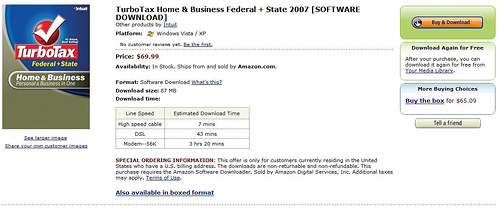
 There’s one thing I really, really don’t like about this new Amazon service: before you can purchase anything, you need to download and install the “Amazon Downloader”, which in turn will download and install the actual product. Now, I don’t know about you, but I certainly am not buying software frequently enough to justify the need for a client, whatever benefits(?) this approach may offer. And of course once you install software, you know you’re in for a lifetime of endless updates…
 :
: . Intuit is clearly throwing in support resources, customers can register and will be called back to individually assess their situation. For many, the damage may very well be more than losing a few hours:
 Who has time for this? Between the applications we actually use and all the crapware needed just to keep our computers running (virus scan, firewall, anti-spy, desktop search, backup, synchronization …etc), it’s just getting way too much to deal with.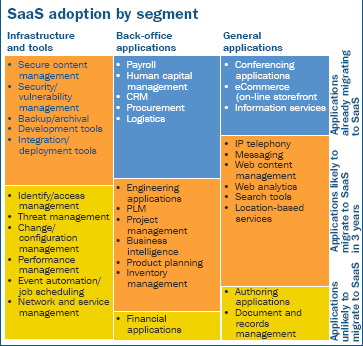


Recent Comments